On August 6, 2026 (US time), Cloudflare published a blog post titled “Give any website a WebMCP interface” (written by Will Rowe). Part of the company’s announcement week it calls “Agents Week,” it is a developer preview that adds a set of WebMCP tools to a site with no code changes—just a switch flipped in the dashboard. Since our own site runs on Cloudflare, this article organizes the content of the announcement, along with the current state of the WebMCP standard proposal it builds on, based on official sources.
Background — a web built for humans, and visitors who are not human
Cloudflare’s post states the motivation for the feature as follows.
The web was built on the assumption that there is a person on the other end: someone to read the page, click buttons, and fill in the forms. But now more and more visits come from AI agents instead, to an Internet made for humans.
The mainstream approach so far has been crawlers: a method that copies content back to a server for use elsewhere. Cloudflare notes that this “too often, give[s] the original site none of the traffic and little of the credit,” and continues that “there is a better way, and it does not involve scraping.” We previously examined the relationship between sites and AI crawlers through each company’s official documentation in an earlier article. This announcement can be seen as one attempt to shift that relationship from “waiting to be copied” to “handing tools to the agents that come to visit.”
What WebMCP is — a proposed browser standard for pages to hand “tools” to agents
WebMCP is a proposed browser API that lets a web page expose structured tools (pairs of a function and an input schema) for AI agents. The W3C Web Machine Learning Community Group publishes a draft specification; in the July 28, 2026 version of the draft, each Document object has an associated ModelContext, and a page registers tools with document.modelContext.registerTool(). Registration requires a name (identifier), a description (a natural-language explanation), and an execute function, with an optional JSON Schema inputSchema and annotations such as readOnlyHint, which indicates a tool is read-only.
The standardization stage deserves attention. As the draft itself states, it is a Community Group working document—not a W3C Standard, and not on the standards track. Browser-side implementation is also experimental: according to Chrome’s official documentation (updated June 9, 2026), it can be enabled with the local development flag chrome://flags/#enable-webmcp-testing, and an origin trial is available from Chrome 149 onward. Cloudflare’s post describes it as “shipping experimentally in Chrome 146.” Either way, as of this writing it does not run by default in ordinary visitors’ browsers.
As the name suggests, the foundation is the Model Context Protocol (MCP). MCP is an open protocol for exchanging tools and context between applications and AI models, and is usually implemented as a server. WebMCP brings that notion of tools into the page inside the browser, and Cloudflare’s implementation uses the MCP specification’s own Tool and CallToolResult types as-is. The post summarizes it this way.
To an agent, all of these are ordinary MCP tools. We use Model Context Protocol’s own Tool and CallToolResult types, so an agent that already talks to MCP servers can drive a page with nothing special added. The browser is just another place MCP runs.
The benefit for agents is that they no longer have to operate an interface designed for humans by “guessing” their way through it. Instead of hunting for the position of a button or inferring the meaning of a form from the screen, they can call a schema-annotated function, spending tokens on the task itself rather than on navigation, as Cloudflare explains. Until now, however, this required the site to implement WebMCP itself. This announcement offloads that implementation work to the edge.
Cloudflare’s implementation — a one-line injection at the edge and a bridge that runs in the page
Cloudflare’s implementation consists of two parts, both completed in front of the origin (the site itself). It touches none of the site’s code, and is said to work the same way whether the site is static or a single-page app.
The first part is injection at the edge. When WebMCP is enabled in the dashboard, HTMLRewriter (Cloudflare’s HTML rewriting mechanism running at the edge) adds the following single line to every HTML response. Both the script tag and the script body are served from the same-origin edge, and nothing else about the page changes.
<!-- Cloudflare injects this at the edge. Same origin, and your HTML is otherwise untouched. -->
<script type="module"
        src="/.webmcp/bridge.js"
        data-packs="c2pa,mcp-server-client"
        data-mcp-url="/mcp"></script>
The second part is this bridge.js (the bridge). It runs in the page and first checks whether the browser has a WebMCP interface. If not, it returns without doing anything, so on unsupported browsers the page behaves exactly as before. If the interface exists, it composes the “tool packs” listed in the data-packs attribute into a single tool list and registers each with registerTool.
A tool pack is a unit that bundles MCP tool descriptors with their handlers. Packs are designed to grow: as more are added, a site can opt in to them with a toggle, no redeploy needed. This preview includes two packs, both of which run entirely in the visitor’s browser (there is no round trip to a Cloudflare server).
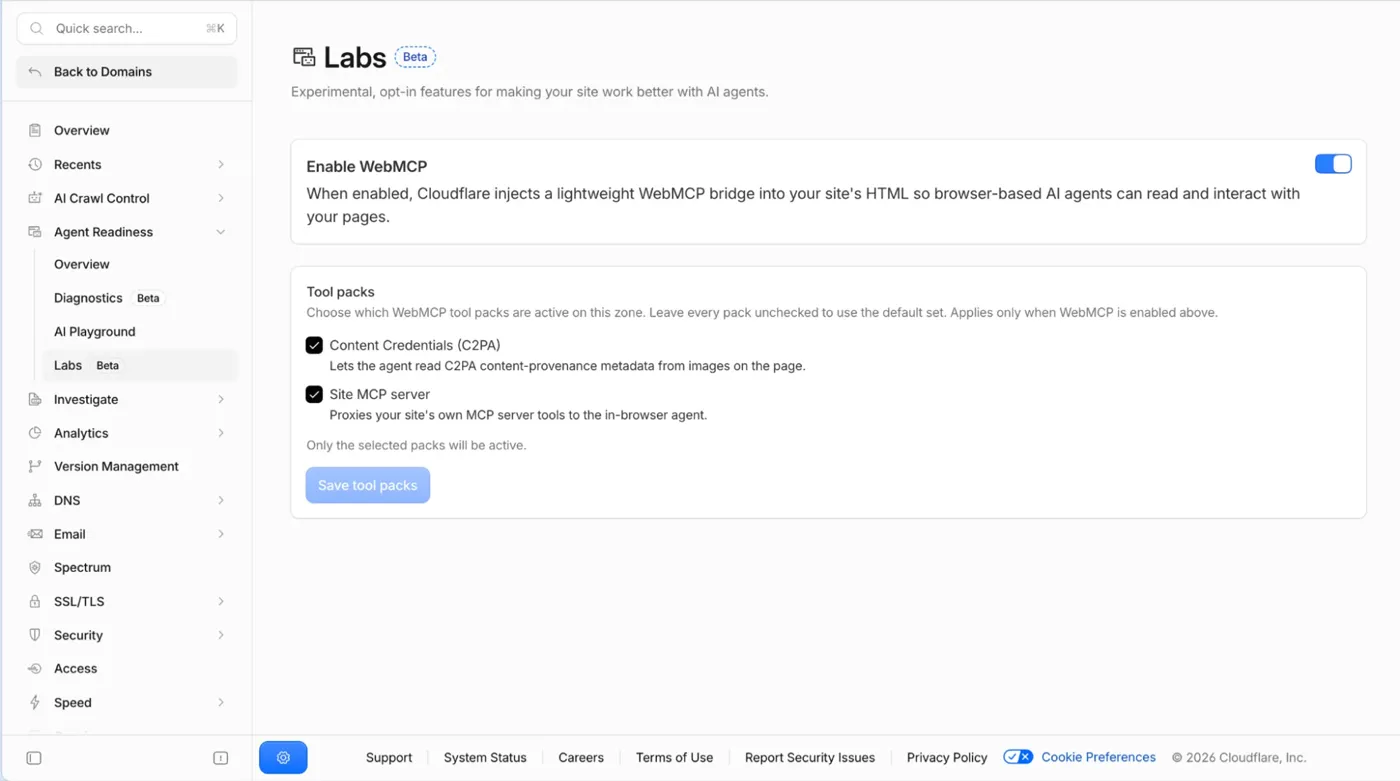
Figure 1: The WebMCP settings screen under Agent Readiness > Labs in the dashboard. Tool packs can be enabled individually (source: The Cloudflare Blog)
The Site MCP Server pack — making an existing MCP server usable through the page
If a site already has its own MCP server, this pack fetches the tool list via tools/list at boot and registers a “proxy” for each tool on the page. When an agent calls a proxy tool, a tools/call request is sent from the page to the same-origin MCP endpoint, using the visitor’s own session.
// For each tool the site's own MCP server advertises (via tools/list),
// registering a proxy whose execute() calls the site back on the
// visitor's origin, with their session.
document.modelContext.registerTool({
  name: tool.name,                 // e.g. "search_products"
  description: tool.description,
  inputSchema: tool.inputSchema,   // taken straight from tools/list
  execute: async (args) => {
    const res = await fetch(mcpUrl, {   // same-origin /mcp
      method: "POST",
      credentials: "same-origin",
      headers: { "content-type": "application/json" },
      body: JSON.stringify({
        jsonrpc: "2.0", id: 1, method: "tools/call",
        params: { name: tool.name, arguments: args },
      }),
    });
    const { result } = await res.json();
    return result;   // an MCP CallToolResult, passed straight through
  },
});
As the credentials: "same-origin" option indicates, calls execute with the session (login state) already present in the visitor’s browser. Rather than wiring separate authentication into a remote MCP server, the structure lets the agent act within the bounds of “what that person can already do in their browser.”
The Content Credentials pack — reading provenance metadata in images
The other pack reads metadata from C2PA (Coalition for Content Provenance and Authenticity), the industry standard for content provenance. scan_images_c2pa sweeps every image on the page and returns a summary, while inspect_image_c2pa unpacks one image’s manifest (edit history, stated author, signing certificate). It is a TypeScript implementation that reads only the first few kilobytes of metadata rather than the image itself, and it too runs entirely in the visitor’s browser.
{
  "imageCount": 12,
  "scanned": 12,
  "withC2pa": 8,
  "results": [
    {
      "src": "https://example.com/hero.jpg",
      "hasC2pa": true,
      "format": "image/jpeg",
      "manifestCount": 1,
      "claimGenerator": "Adobe Firefly",
      "title": "sunrise over the bay",
      "signedBy": "Adobe Inc."
    },
    { "src": "https://example.com/logo.png", "hasC2pa": false, "format": "image/png" }
  ]
}
There is an important limitation. At this stage the pack only “reads and reports” the credential and performs no cryptographic verification. Every result carries signatureVerified: false, so that an agent will not mistake a decoded claim for a checked one. Confirming that a provenance claim has not been forged is not provided at this stage.
Positioning and points to keep in mind
Based on our review of the announcement, the following points are worth keeping in mind.
- The standard is still at the proposal stage. The WebMCP specification is a W3C Community Group draft, outside the standards track. The shape of the API (including where
document.modelContextsits) may still change - It only runs in experimental environments. Chrome requires a flag or the origin trial (Chrome 149 and later), and in ordinary visitors’ browsers the bridge exits without doing anything. For now this means neither harm nor benefit reaches ordinary visitors, but a supported environment is needed to see the effect. Cloudflare says its remote browser, BrowserRun, can discover and call WebMCP tools, and points to it as a way to verify
- Agents act with the visitor’s session. Calls from the Site MCP Server pack inherit the visitor’s login state. What operations to allow an agent becomes a design question for the site: which tools to expose. The draft specification also provides annotations such as
readOnlyHint, which marks a tool read-only, anduntrustedContentHint, which marks content as coming from untrusted sources—safety design is still evolving in both the spec and implementations - Reading C2PA is not verification. As noted above,
signatureVerified: falseis always attached - Enabling it is a single toggle. Turn it on under Agent Readiness > Labs in the dashboard, and confirm the injected line with
curl -s https://your-site.example | grep webmcp
As for our own site, we have not enabled it as of this writing. For a site centered on static content such as a blog, the first question is a matter of design—what “tools” would even be worth exposing to agents—and we plan to decide while watching the standard and implementations mature.
Summary
- On August 6, 2026, Cloudflare announced a developer preview of WebMCP. A dashboard toggle alone adds agent-facing tools to a site, with no code changes
- WebMCP is a proposed browser standard that lets a page hand structured tools to AI agents via
document.modelContext.registerTool(). It is at the draft stage in the W3C Web Machine Learning Community Group, and in Chrome it runs only behind a flag or in an origin trial - The implementation has two parts: a one-line
<script>injection at the edge and a bridge that runs in the page. On unsupported browsers nothing happens, and the page renders as before - The preview includes two tool packs. Site MCP Server lets an existing MCP server’s tools be called from the page with the visitor’s session, and Content Credentials reads C2PA provenance metadata in images (cryptographic verification is not yet performed)
- Rather than being copied by crawlers, the site itself hands tools to visiting agents—a direction in which both the standard and the implementations are still works in progress
References
- Give any website a WebMCP interface — The Cloudflare Blog (August 6, 2026, by Will Rowe) — the primary source for this article. The thumbnail and Figure 1 are taken from this post
- WebMCP — Draft Community Group Report (W3C Web Machine Learning Community Group, July 28, 2026 version)
- webmachinelearning/webmcp — GitHub — the proposal’s repository and explainer
- WebMCP | AI on Chrome — Chrome for Developers (updated June 9, 2026) — guidance on the flag and the origin trial
- Model Context Protocol — the MCP specification
- C2PA — Coalition for Content Provenance and Authenticity