
On August 5, 2026 (US time), during the announcement week Cloudflare calls “Agents Week,” the company published two posts at once about its internal platform, Cloudflare OS. The first is the platform announcement itself, “Cloudflare OS: an open platform for agents, apps, and work” (by Phillip Jones and Dan Carter); the second is “How we’re rethinking work at Cloudflare with Cloudflare OS,” in which CIO Sam Rhea looks back on the internal rollout. Our own site runs on Cloudflare, and the question of how to put generative AI in every employee’s hands is common to organizations of any size, so this article organizes both posts based on their original text.
The announcement in brief — an internal platform, rebuilt and open-sourced
The outline is as follows. Cloudflare gave every employee access to the first version of Cloudflare OS in May 2026, and thousands of people—many outside engineering—have used it daily to create documents and slides, automate repeatable tasks, and build small apps to visualize data. Based on the lessons learned (discussed below), the company rebuilt the platform on a new foundation and has now released the new version as open source. Any organization can deploy it into its own Cloudflare account and connect it to internal systems.
On what Cloudflare OS is, the announcement states early on:
That’s why we created Cloudflare OS. It gives every person an agent and workspace built around their company: how it works, what it knows, and the systems it relies on.
The platform is described as a combination of three parts:
- An agent workspace grounded in the context and skills the company curates, with an isolated runtime where agents can write and run code
- A security and governance framework that guarantees safe access to internal data and services at the platform level
- An app runtime supporting personal, modifiable apps that people can build, share, and keep changing
The intended usage is that what begins as a conversation in the browser can become a document, an app, or a workflow that keeps doing the work while you are away. No terminal or developer tooling knowledge is assumed.
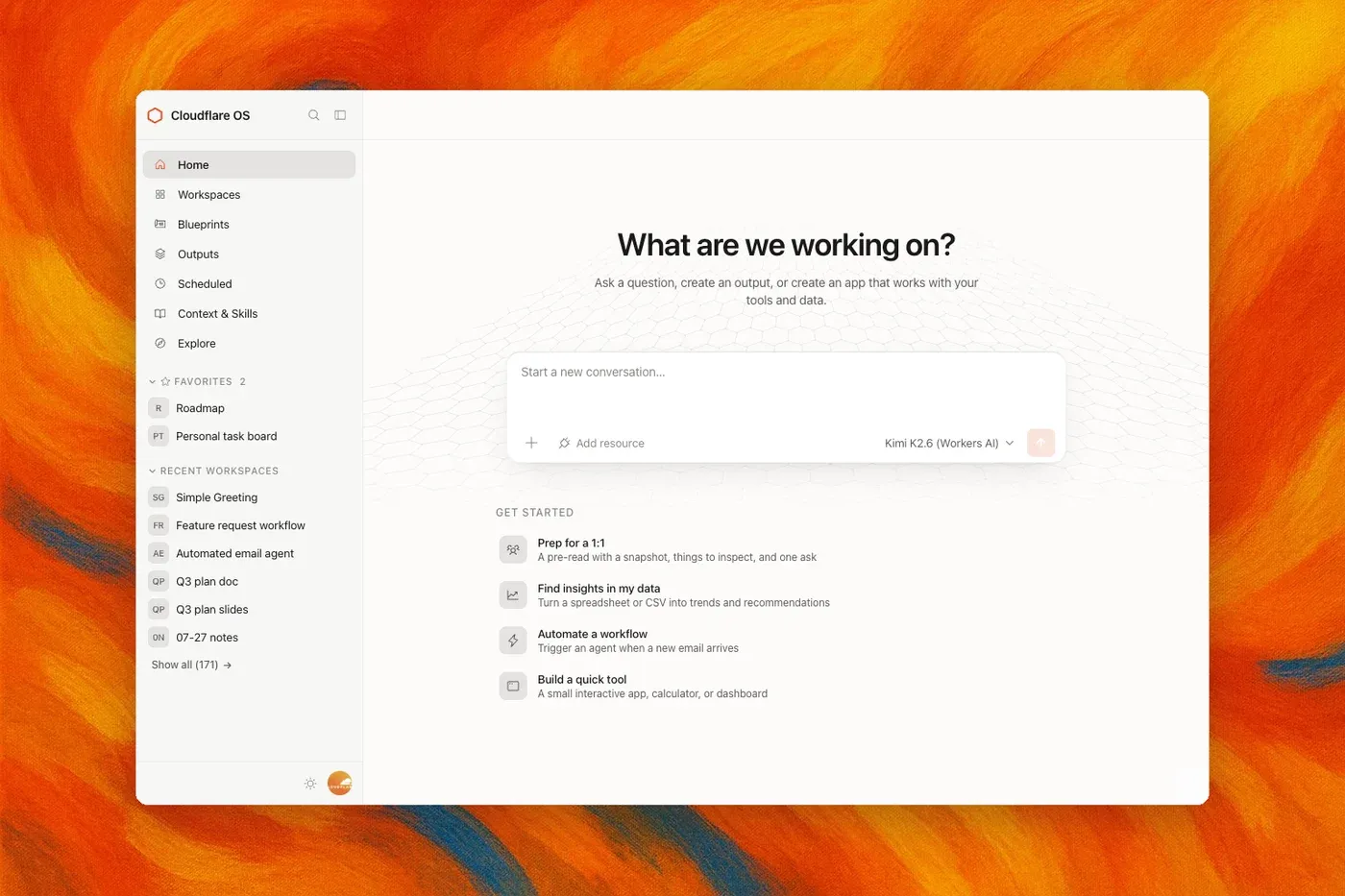
Figure 1: A workspace starts from a conversation in the browser, grounded in the context and skills the company has curated (source: The Cloudflare Blog)
The listed capabilities include research using company context (the agent writes code to search, filter, join, and analyze instead of pulling an entire dataset into the model’s context window); creating documents, slides, and spreadsheets (not static files—they can stay connected to live data, update as sources change, and still export to services such as Google Drive); building collaborative apps for a team; and running deterministic workflows. The last point is also the crux of v2, discussed below, and it reflects a consistent philosophy: many jobs are a known sequence of steps with judgment needed in only one or two places, so code handles the predictable parts and a model is used only where it adds value.
Security — agents start with nothing
Access control gets the most space in this announcement. The starting observation is that when people begin using AI at work, one of their first requests is API keys to company systems. Keys tend to grant broad, long-lived access that is hard to constrain, share safely, or audit. The current standard answer is to put the credential in an MCP (Model Context Protocol) server and expose only tools—but Cloudflare argues that this is not enough. MCP tells you which tools an agent can call, not which underlying data it actually observed. An agent can combine information across systems, send it somewhere less restricted, or expose it through apps and outputs to people who are not allowed to see the original resources. Authorization, the post argues, has to account for where the data can go next.
Cloudflare OS’s design answers this in three layers.
First, agents and apps start with access to nothing. Cloudflare Access (the company’s zero-trust authentication) controls who can enter; inside, an agent asks for access to a specific resource, and a person grants or denies it. A granted resource is handed to generated code as a typed binding:
const issues = await env.PROJECT.listIssues({
  teamId: "ENG",
  state: "open",
});
env.PROJECT is a capability representing permission to use a specific resource under a specific policy; the credential itself remains completely isolated from the agent and any generated code. Server code runs in a Dynamic Worker with global outbound networking disabled, and client code runs in a sandboxed frame in the browser. Neither can reach the Internet except through explicitly provided capabilities.
Second, Gatekeepers. A Gatekeeper is a service-specific Worker that sits between Cloudflare OS and an external service, understanding that service’s API, resources, and operations. Giving an agent your entire GitHub account is likely too broad; a Gatekeeper can scope it to a single repository, allow reading issues but not source code, mask particular fields, apply rate limits, and require human approval before merging a pull request. It handles OAuth, holds the credential, enforces policy, records what was read, and mediates anything with an externally visible side effect. All the agent sees is a small TypeScript API.
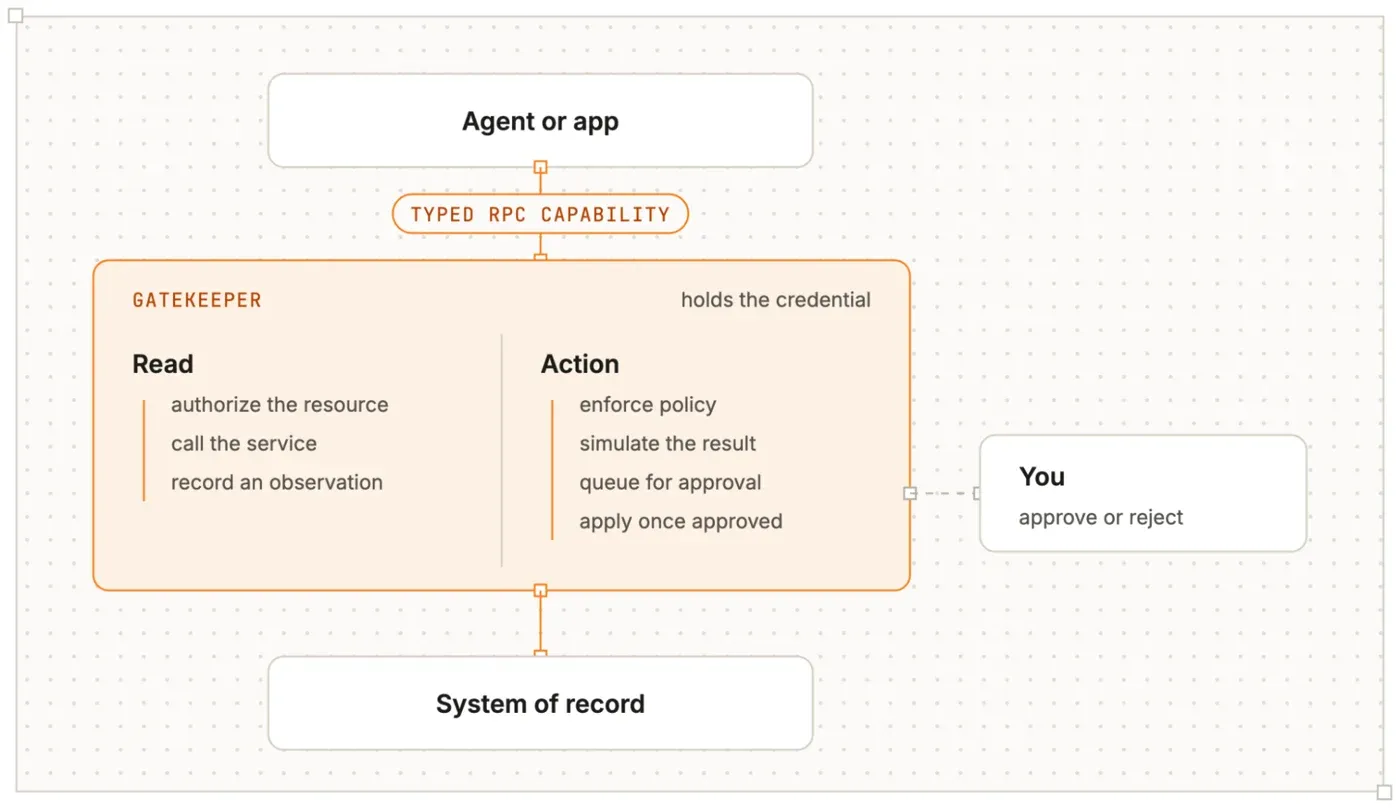
Figure 2: A Gatekeeper is a per-service Worker that single-handedly isolates credentials and enforces policy (source: The Cloudflare Blog)
Third, policy follows what the agent has seen—the design core of this announcement. Suppose an agent reads a sensitive table in a data warehouse and produces a live dashboard: sharing the dashboard must not become a way to share the table with people who could not access it directly. Cloudflare OS records every resource an agent observes, and those observations stay attached to the agent and its work. When another person opens the workspace, interacts with the agent, or views what it produced, Gatekeepers verify that person’s own access to the observed resources. The same observation log informs whether an agent may make external requests: having read sensitive data can prevent it from writing to certain destinations, inviting new collaborators, handing work to another agent, or making an outbound request.
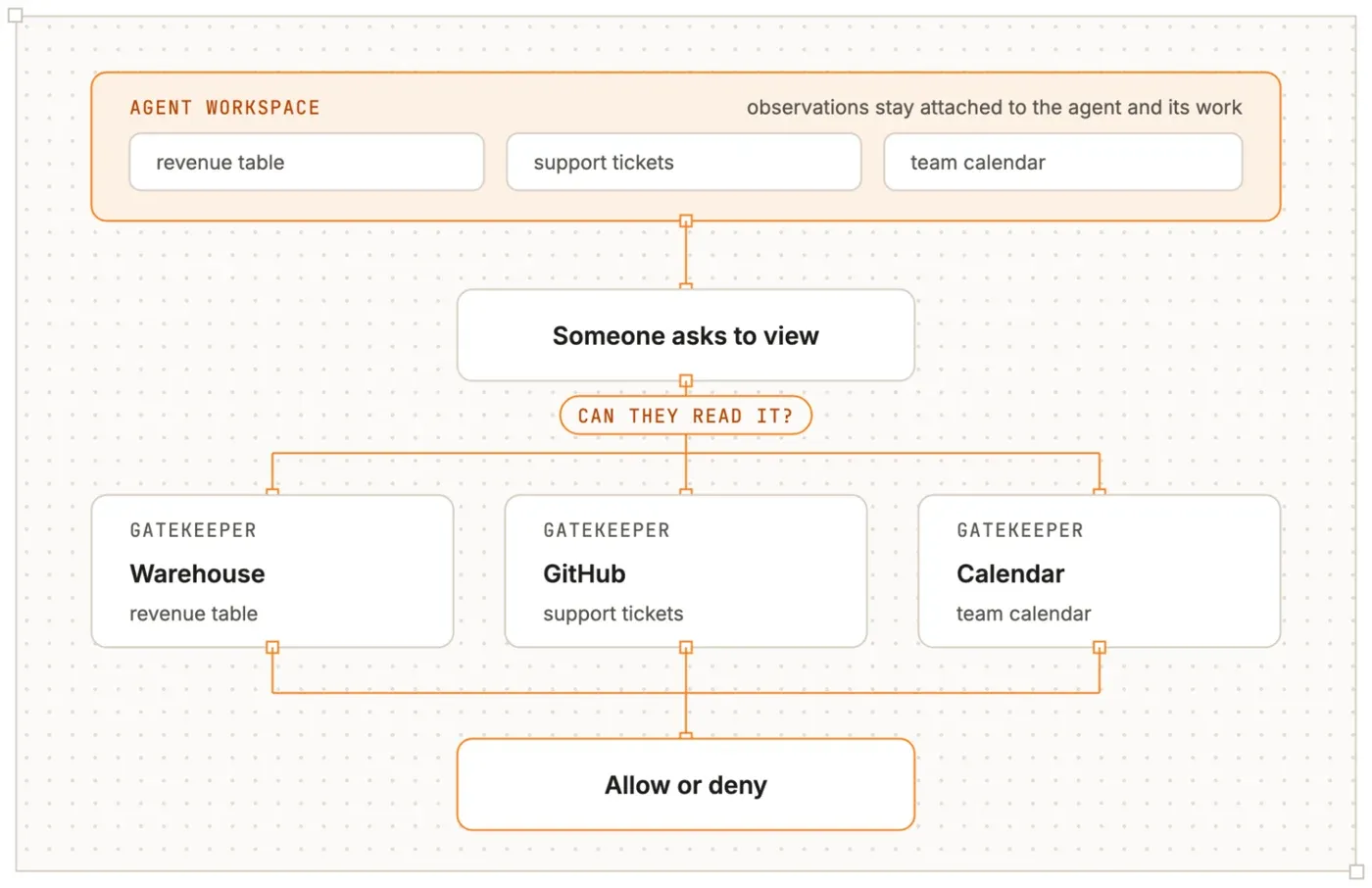
Figure 3: Who can see what is verified not at the level of the output but against the record of what the agent observed (source: The Cloudflare Blog)
Rather than each app author or user implementing these controls, the platform takes them over. The stated conclusion drawn from operating v1: security had to be part of the platform, not something every person building an app or using an agent has to implement correctly.
Every app is a Worker — a “file” becomes your own full-stack app
The other distinctive feature is how apps are treated. Where traditional productivity suites give you a fixed set of applications—documents, spreadsheets, presentations—in Cloudflare OS each “file” can itself be an application. The agent writes client code (rendering the UI in the browser) and server code (storing state and implementing behavior); the server side is loaded on demand as a Dynamic Worker and instantiated as a Durable Object Facet (both are platform features Cloudflare built for this project). Each app gets its own SQLite database and runs in lightweight V8 isolates, so no dedicated server or container needs to sit around.
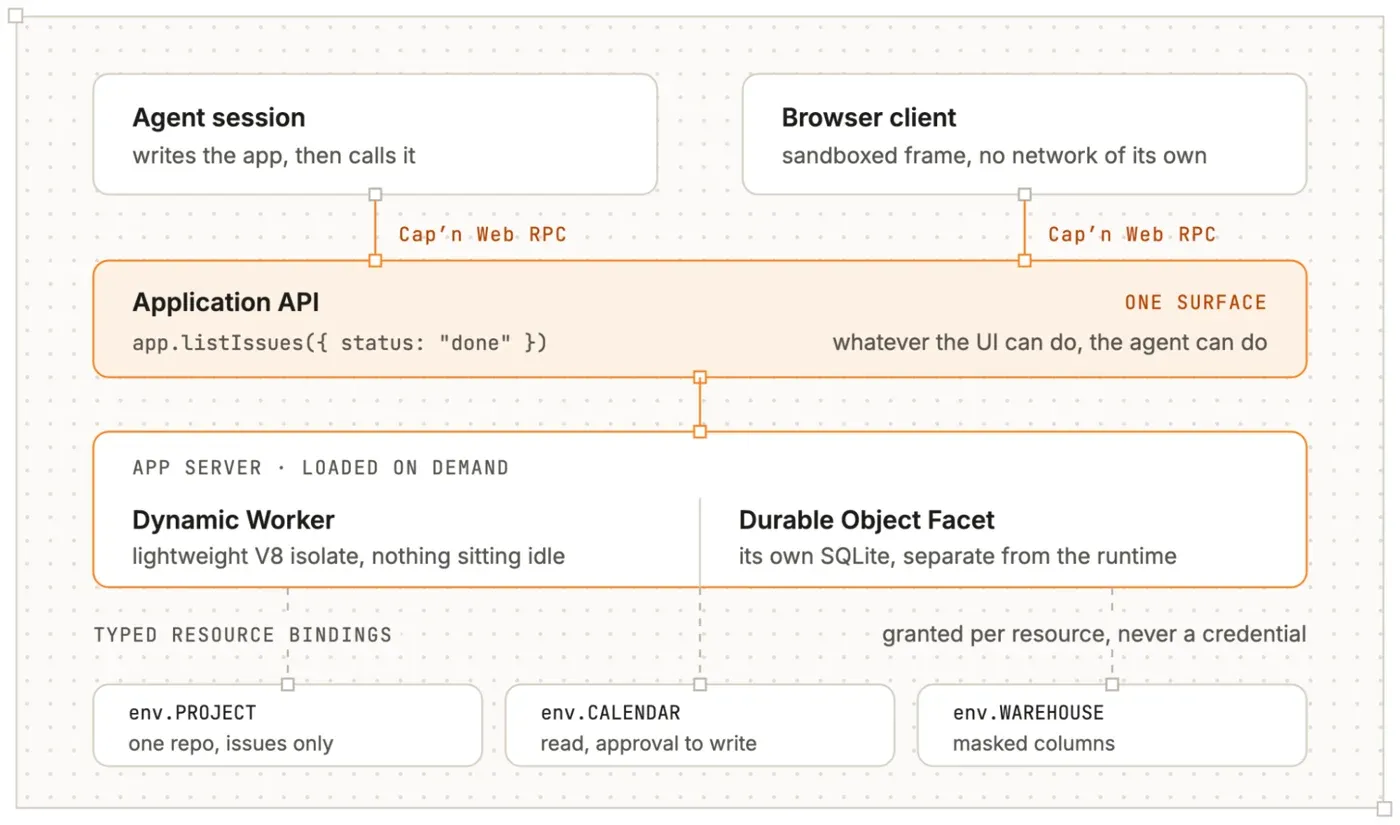
Figure 4: Each app runs as a full-stack application with its own client, server, API, and durable state, in its own isolated runtime (source: The Cloudflare Blog)
Communication between the browser and the server uses Cap’n Web, Cloudflare’s open-source object-capability RPC system, so a server method can be called like a normal JavaScript function:
const issues = await app.listIssues({
 status: "done",
});
The important part is that the agent can call the same methods. The announcement puts it this way: if you can build a tool to do a job yourself, agents can use your tool to do the job when you’re not there. Sharing works in two ways: sharing the app itself lets others collaborate in real time on the same state, while sharing a blueprint lets others create their own copy. An app instantiated from a blueprint contains the original code but not its SQLite data, conversation history, credentials, or connected resources—it starts with independent state.
Any model can be used, and every inference call runs through Cloudflare AI Gateway. An organization can centrally decide which models are available and which model handles which job; every request is attributed to the person, team, or workspace that made it, so administrators can see where inference spend goes, set budgets and rate limits, and decide what happens at the limit.
The CIO’s account — it started with a request for API keys
The second post is CIO Sam Rhea’s account of the internal rollout. It opens with a telling anecdote: about six months earlier, a member of the sales organization asked for API keys—plural—to power an AI-built “SuperApp,” requesting production access to about a dozen systems of record and admin permissions on a deployment pipeline. That was the moment, the post says, of realizing there was a problem. Through 2025 the company had taken a cautious approach—informational chat applications, some boilerplate-code assistance—but over a few days at the end of the year, “better models and more powerful harnesses changed that calculus.” Agents could now do real work, and hundreds of team members in technical and non-technical roles spent the quiet weeks around the New Year experimenting.
The company began by setting principles. In summary, the five are:
- Use AI to spend more time with customers and solve more of their problems (no AI for AI’s sake; define the “jobs to be done” first, then pick the tool)
- Everyone deserves superpowers (don’t leave behind employees who don’t live in developer tools)
- The human owns the output
- The context from the organization matters more than the model
- You should never have more permission with systems of record when using AI (access provided through a shared agent reflects the recipient’s permissions, not the sharer’s)
On the third principle, the original reads:
We view AI as a tool and toolmaker, not a team member. We expect humans to take responsibility for defining the quality, testing, and workflows that rely on AI output.
For engineers, the company built a context layer it calls the Cloudflare Engineering Codex—a deliberately opinionated guide that says what you should do rather than what you can’t, with a domain owner accountable for each part of the codebase. Surfacing the Codex across the development lifecycle—agents review every Merge Request, technical designs before implementation, and incident reports—the company reports that in the past four months these agents flagged nearly a quarter of a million potential problems, blocked 16,000 merges, and caught architectural issues in close to 600 designs before a line of code was written.
The “magic email alias” — seeding automation by hand
The trial and error on the non-engineering side is the most candid part of the post. The first mistake was giving everyone the same tools as engineers with slightly friendlier interfaces. Hand everyone a harness workspace that is great at writing code, and you get more code than you need—the result is described as “a flood of vibe coded apps looking for a problem to solve.”
So the company worked backwards. It told everyone they could send work they did not want to do to a “magic AI email bot” that would respond with the output they needed. Behind the scenes, a small team of humans staffed the alias using AI tools. People, it turns out, are reluctant to send vibe-coding ideas to what they believe is an automated system, but very willing to send work they don’t want to do. Over hundreds and then thousands of sessions, patterns of automatable, mundane work emerged across departments, along with the skill and context files, data connections, and output formats needed. The post is blunt: “We were very motivated to stop staffing this service. It was miserable.”
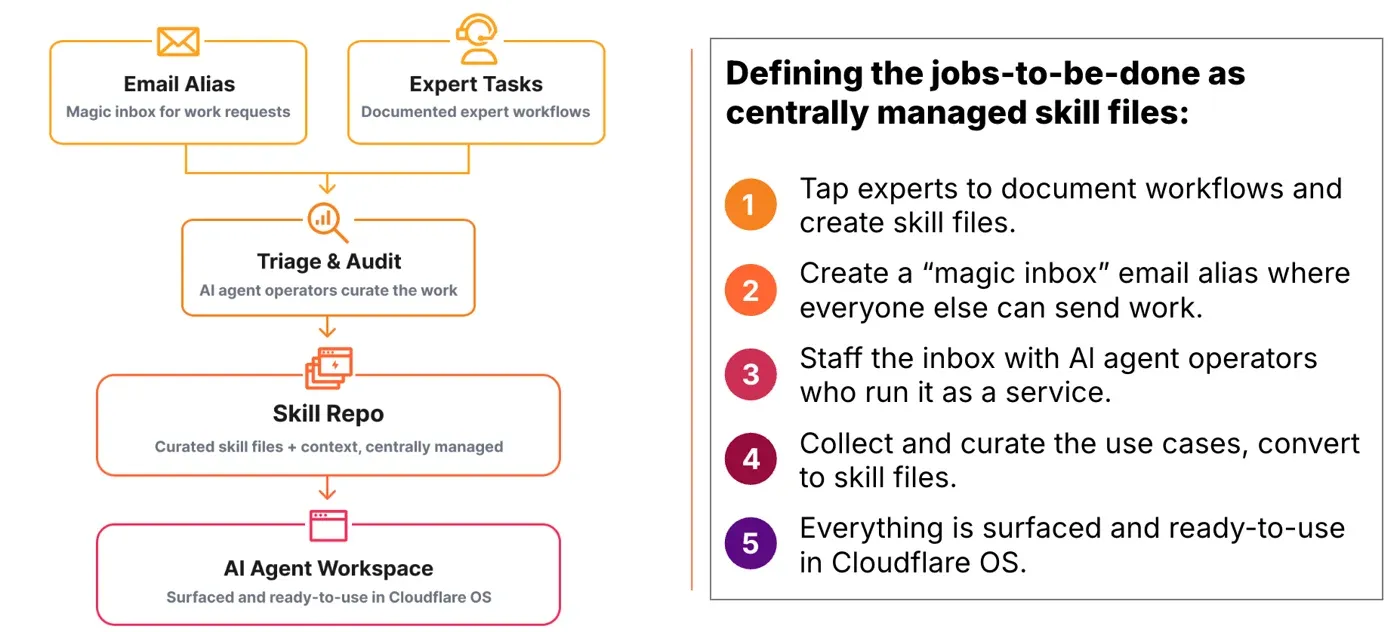
Figure 5: Behind the "magic email alias." A window that looked automated was run by humans, surfacing the routine work with real automation demand (source: The Cloudflare Blog)
From v1 to v2 — turning token-burning work into code
V1, built as the place to put that accumulated knowledge to work, was a simple harness running in a container on Cloudflare’s infrastructure. Accessed from a browser and authenticated through Cloudflare Zero Trust, it required no local configuration. The ephemeral cloud environment could only access data a user introduced into the session, and the security team had audit visibility and network control over where it could connect. Data connections went through the MCP Portal, with each user session scoped to that person’s existing permissions in each system of record. Inference went through AI Gateway, where DLP (data loss prevention) rules from the Secure Web Gateway could be reused to block certain datasets from ever being sent to a provider.
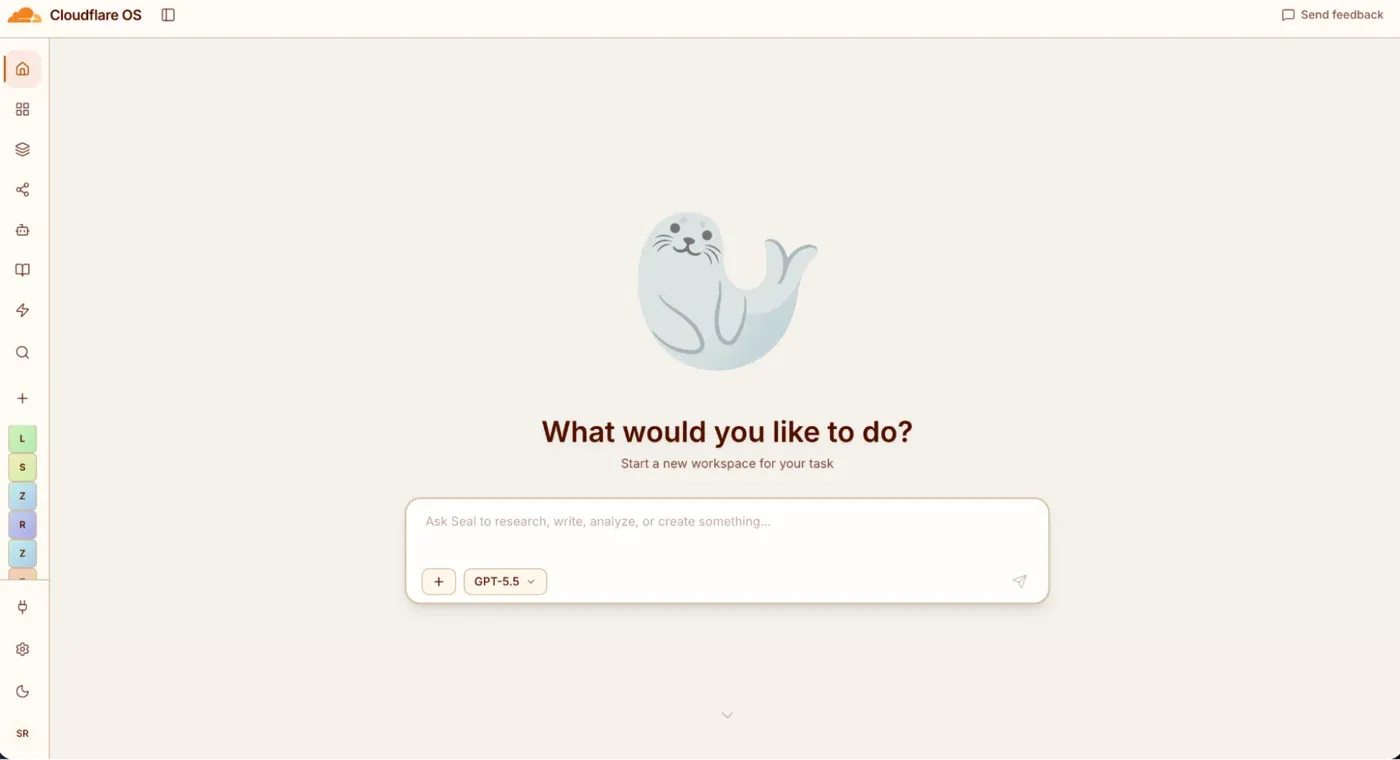
Figure 6: The internal Cloudflare OS v1. Usable from a browser alone, with accumulated skill files executable in a single click (source: The Cloudflare Blog)
But v1 had a structural inefficiency: every skill file run kicked off a token-hungry inference session. Rhea’s own example is concrete. Reviewing the IT help desk ticket queues each morning ran as a skill file connected to the ticketing system’s MCP server—which meant “burning thousands of tokens each morning recreating a report that was mostly the same.” In the v2 released today, you describe a workflow in natural language, an agent writes the code to power it, and it runs on demand, on a schedule, or on an event. The same morning report now runs as code—zero tokens on the initial load—with inference embedded only where judgment helps, such as drafting responses to newly arrived tickets. Sharing the app does not cross data boundaries: recipients authenticate through the same Gatekeepers with their own permissions.
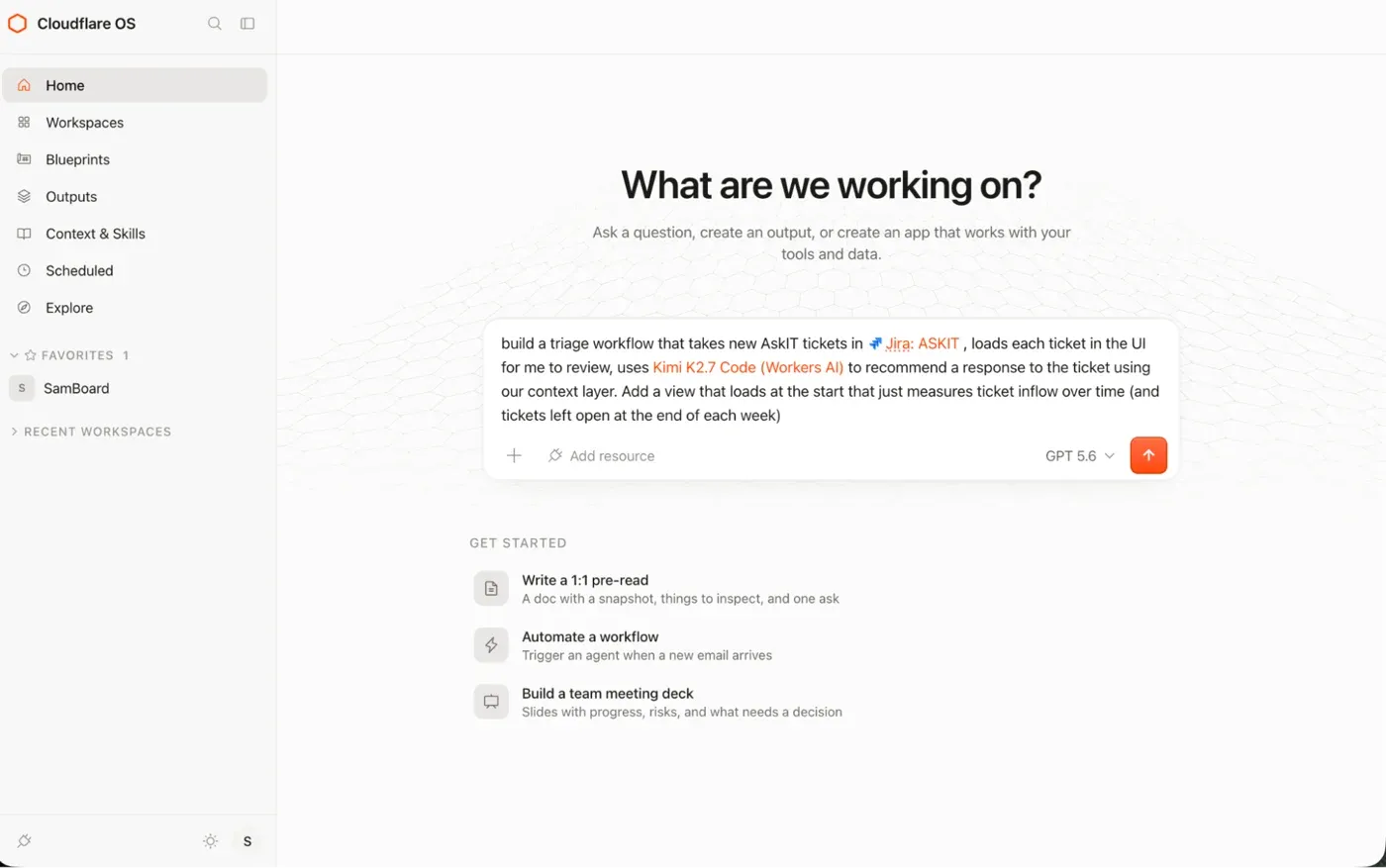
Figure 7: The ticket-queue dashboard built on v2. Code handles the routine morning report; inference is used only where judgment is needed, such as drafting replies (source: The Cloudflare Blog)
For the rollout, the company did not hire a dedicated AI team. It organized early adopters in various roles as “champions” (a sales leader in London, a solutions engineer in Texas, an investor relations leader in Portugal, a business development team member in Japan, among others) and embedded many interns—this year’s hiring goal is 1,111—into departments with the goal of “make this team into all-stars by equipping them with our AI tools.” The results the company reports: thousands of team members use the platform weekly, with daily active users growing every single workday; an estimated 10,000+ hours saved by sales team members in the last month on previously manual tasks such as territory planning and proposal creation; and over 4,000 apps and tools created in 30 days. All of these are the company’s own reports and estimates, not independently verified figures.
Positioning and points to keep in mind
- Scope of the open-source release: Two repositories were published—the core (
cloudflare/cloudflare-os) and an example deployment based on the company’s internal setup (a starter,cloudflare/cloudflare-os-starter). The deployment repository consumes the core without patching it, carrying configuration, custom UI, internal integrations, analytics, and deployment pipelines; a demo is available at os.cloudflare.app - Operating assumptions: Deployment into your own Cloudflare account is assumed, with your own Access policies, AI Gateway configuration, data, and integrations. Dynamic Workers and Durable Object Facets—platform features built for this project—are provided as Cloudflare platform capabilities
- The source code is only the starting point: The announcement itself states that the context, skills, workflows, internal systems, and policies are what make Cloudflare OS useful. Two partners, Presidio and Happy Cog, are named for customization and rollout—a model combining open code with commercial deployment support
- Roadmap: Bringing Cloudflare OS to the Cloudflare dashboard as a fully managed product, adding containers for development workflows, and bringing workspaces into Slack and other chat tools are all announced as in progress
- On the numbers: The rollout results in the post (a quarter of a million flags, 10,000 hours saved, and so on) are all self-reported. That said, the account records the failures too—the flood of apps, the misery of staffing the email alias by hand—which places it among the more honest write-ups of an internal AI rollout
Summary
- On August 5, 2026, Cloudflare open-sourced Cloudflare OS, the AI agent platform it had been providing to all employees, structured in three layers: workspace, security and governance, and app runtime
- The design core is access control. Agents start with no permissions; resources are handed over as typed bindings with credentials isolated; per-service Gatekeepers enforce policy; and what each agent has observed is recorded, so that when outputs are shared, viewers’ own permissions are checked against the observation log
- Each app runs isolated as a full-stack Worker with its own client, server, API, and SQLite; methods people use can also be called by agents. All inference runs through AI Gateway, giving the organization central control over model choice and cost
- The CIO’s post records the journey with its failures included: the alarm of a bulk API-key request, five principles, the Engineering Codex and review agents, the human-staffed “magic email alias” that surfaced the real jobs to be done, and the rebuild from token-hungry v1 to workflow-centric v2
- The published code is a starting point; the real substance is curating each organization’s context and skills and connecting internal systems through Gatekeepers. The rollout figures are the company’s own reports
References
- Cloudflare OS: an open platform for agents, apps, and work — The Cloudflare Blog (August 5, 2026, by Phillip Jones and Dan Carter) — the primary source for this article. The thumbnail and Figures 1–4 are taken from this post
- How we’re rethinking work at Cloudflare with Cloudflare OS — The Cloudflare Blog (August 5, 2026, by Sam Rhea) — Figures 5–7 are taken from this post
- cloudflare/cloudflare-os — GitHub — the released core
- cloudflare/cloudflare-os-starter — GitHub — the example deployment (starter)
- cloudflare/capnweb — GitHub — the RPC system used for app communication
- Dynamic Workers — Cloudflare Docs — the app runtime (including Durable Object Facets)
- MCP Server Portals — Cloudflare Docs
- Model Context Protocol — the MCP specification