I run this site on a combination of Astro (a static site generator) and Cloudflare Pages, and I have assembled the whole path to publication myself: build, deploy, and DNS configuration. OpenAI has now released a feature — ChatGPT Sites — that folds that entire sequence into “just asking the chat,” and in July 2026 its availability expanded to paid plans in general. This article is the result of reading through the official documentation (learn.chatgpt.com) and the Help Center article, and organizing what the feature can and cannot do (all statements are based on the content as viewed on July 27, 2026).
What is ChatGPT Sites?
The official documentation opens with the following definition.
Sites lets ChatGPT create, host, refine, and share websites, web apps, and games. Use Sites when you want to turn a prompt or compatible existing project into a hosted experience without setting up a separate deployment workflow.
(With Sites, ChatGPT can create, host, refine, and share websites, web apps, and games — for turning a prompt or a compatible existing project into a hosted experience without building a separate deployment pipeline)
The key point is that this covers not only generation but hosting. It has long been possible to have a chat AI write website code, but publishing it required the user to arrange hosting separately. Sites brings that latter half — hosting, URL issuance, access control, analytics — inside ChatGPT.
Availability
According to the Help Center:
- Available as a public beta on paid plans except Free and Go. Pro, Pro Lite, Enterprise, and Edu receive it first, with Plus and Business following
- Not available in the EEA, Switzerland, or the United Kingdom at launch (Japan is not on this exclusion list)
- Sites can be used in Work on ChatGPT web, and in Work or Codex in the ChatGPT desktop app
- During the public beta, plan-specific usage limits apply; reaching a limit can prevent creating a new Site, adding storage, or keeping a high-usage Site public (editing and managing existing Sites remains possible)
Timeline
Tracing the official What’s new page, Sites was first announced in the week of June 1–5, 2026, described as a feature that “lets ChatGPT create, save, deploy, and inspect websites, dashboards, internal tools, web apps, and games hosted by OpenAI.” Initially it was a Codex feature; with the general launch of ChatGPT Work in the week of July 6–10, it was positioned as one of Work’s finished outputs, and availability expanded to paid plans in general as described above.
From creation to publication
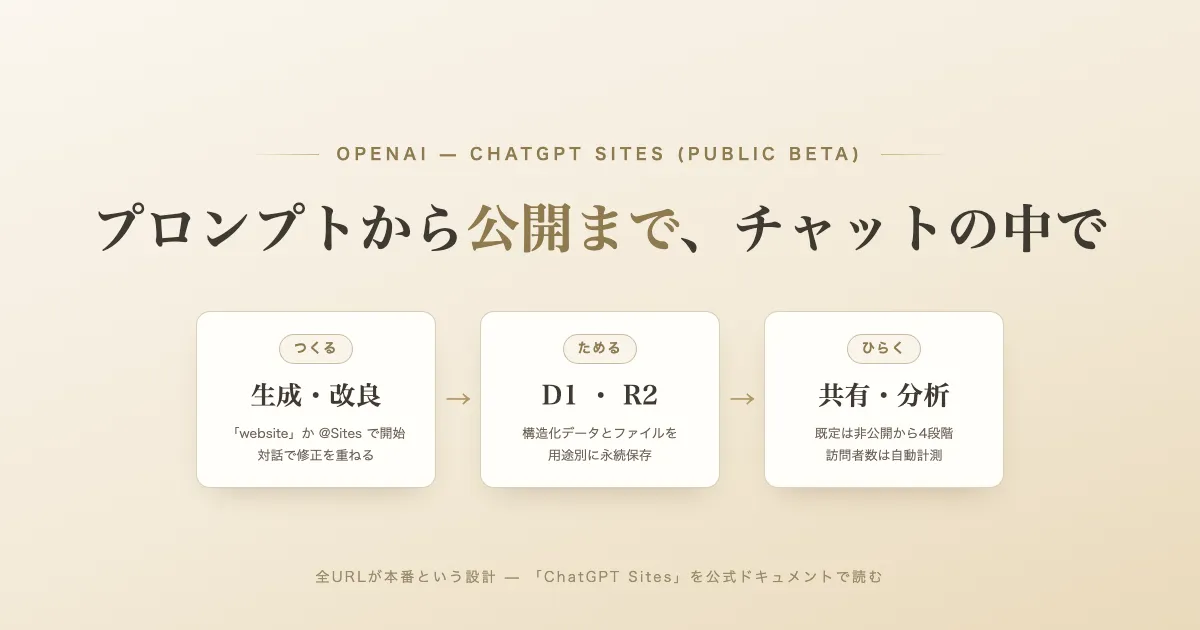
Everything starts with a prompt. Including the word “website” in your prompt, or mentioning @Sites, starts the Sites workflow. The official documentation explains the subsequent flow in four steps.
- Describe — state the audience, purpose, required behavior, and information the Site should use
- Review — check the generated content and behavior, and how data is handled
- Refine — describe the changes you want, attaching relevant files or visual context where helpful
- Manage and share — reopen and refine the Site from the Sites view, then choose who can visit it and share the link
As a point of caution, the documentation places the following sentence near the very top.
Every Sites deployment URL is a production deployment. If you want to review a build before it becomes live, ask ChatGPT to save a version without deploying it.
(All Sites deployment URLs are production deployments; to review a build before it goes live, ask ChatGPT to save a version without deploying it)
In other words, there is no “preview environment” URL of the kind common on general hosting services; publication is controlled through two separate stages.
- Save a version — build and save a deployable version. For a Site built from a local source project, the version is associated with the Git commit used for the build
- Deploy a version — publish a saved version; the production URL is reported when deployment succeeds
Review-then-publish is achieved by the user deliberately separating these two stages.
Site shapes and data storage
Sites has a concept of “site shapes”: what you should ask for changes depending on the capabilities the product needs. Summarizing the table in the official documentation:
| Site need | What to ask Sites for |
|---|---|
| Content-led website or landing page | A Site with no persistent application state |
| Saved records, user progress, or game scores | D1, a relational database for durable structured data |
| Images, documents, audio, video, or other uploads | R2, object storage for files |
| Uploaded files with searchable metadata | D1 for metadata and R2 for file contents |
| Internal site that needs the current workspace user’s identity | Workspace-authenticated user identity |
| Public sign-in or an external identity provider | An authentication-enabled Site |
The linkage between a local project and its hosting is stored in a file named .openai/hosting.json. As an example of a Site that uses a relational database and no file storage, the documentation shows:
{
  "project_id": "<project-id>",
  "d1": "DB",
  "r2": null
}
The names “D1” and “R2” match Cloudflare’s services of the same names (the relational database D1 and the object storage R2), down to the description of their roles. However, I could not find any statement in OpenAI’s official materials about which infrastructure Sites hosting actually runs on (as of July 27, 2026).
The documentation also draws a usage distinction: do not request durable storage for temporary presentation state (such as a theme choice or a dismissed banner); request it only for product data that people expect the hosted site to remember.
Access control is private by default
Immediately after creation, a Site is accessible only to its owner and workspace admins, and the audience does not widen until the user explicitly changes it. Depending on account and workspace settings, four levels are available:
- Owner and workspace admins only
- Selected active users or groups (where supported)
- Anyone in the workspace (where supported)
- Anyone on the internet (only when public publishing is enabled)
In Enterprise workspaces, public publishing is off by default, and members cannot publish publicly unless an admin enables it. Sharing grants viewing only; it does not grant editing rights.
Separately from this, a Site can build in its own sign-in feature, “Sign in with ChatGPT.” The documentation illustrates a configuration where a public Site remains open to signed-out visitors while offering signed-in visitors identity-aware features such as saved progress or personalized views. It also states explicitly that the audience setting and any sign-in feature inside the Site are separate controls.
Analytics and custom domains
Traffic to a deployed Site is recorded automatically: without adding an analytics SDK, the management view shows unique visitors, page views, and both metrics over time (currently unavailable for Sites owned by an Enterprise workspace). In the documentation’s example of the management view, the Site is hosted on a subdomain of openai.chatgpt.site.
Custom domains work by connecting an apex domain or subdomain the user already owns. Sites does not register domains for you; being able to change the domain’s DNS records is a prerequisite. The procedure is conventional: enter the domain in the Site’s settings, add the DNS records Sites provides through your domain provider, and wait for propagation. Custom domains are not available in Enterprise workspaces at launch.
Environment variables and secrets are managed in the Site’s settings; the documentation says explicitly not to put secret values in prompts, attached files, Site content, or .openai/hosting.json. After changing values, redeploying the approved saved version applies the updated configuration.
Limits and prohibited uses
Among the limitations listed in the official materials, these seem most relevant to an adoption decision:
- Only web experiences that run in the supported Sites runtime are supported; some frameworks, private networks, databases, background services, and hosting patterns are not
- Data residency and inference residency are not supported at launch. This covers deployed Sites, code, D1/R2 data, generated artifacts, and logs
- Prohibited uses include processing PHI (Protected Health Information) or payment-card data, targeting children under 13 (or the applicable age of digital consent), distributing malware, phishing, and impersonating people or organizations. Selling goods or collecting payments is possible if done solely through a third-party payment processor, in which case the Help Center explains that responsibility for sales, fulfillment, refunds, taxes, and so on rests with the user
- Regarding training data: for Business and Enterprise/Edu, conversations are not used for training by default. For Free, Go, Plus, and Pro, if the “Improve the model for everyone” setting is on, conversations — including those in which you create, edit, or manage a Site — may be used for training
In addition, OpenAI may remove or restrict a Site at risk of violating its policies, and an appeal channel is provided for removals made in error.
Summary
- ChatGPT Sites is a public-beta feature that generates websites, web apps, and games from a prompt and completes publication and sharing on OpenAI-managed hosting. It appeared for Codex in June 2026 and expanded in July to paid plans in general, excluding Free and Go (the EEA, Switzerland, and the UK are excluded at launch)
- Every deployment URL is production; there is no preview environment. Pre-publication review is achieved by separating “save a version” from “deploy”
- Data storage uses D1 (relational database) and R2 (object storage), with the appropriate “site shape” conveyed through the prompt. The names match Cloudflare’s services of the same names, but I could not confirm any official statement about the underlying infrastructure
- Access control is private by default (owner and admins only); publishing publicly requires an explicit settings change, and in Enterprise workspaces public publishing itself is off by default
- Analytics is built in: unique visitors and page views are available with no additional setup. Custom domains are connected via DNS records on a domain you own
- Prohibited uses such as processing PHI or payment-card data, and the per-plan handling of training data, warrant review before adoption
References
- Sites — ChatGPT Learn (viewed July 27, 2026) — the primary source for this article; the official developer documentation
- Creating and managing ChatGPT Sites — OpenAI Help Center (viewed July 27, 2026) — source for plans and regions, sharing procedures, payments, and training-data handling
- What’s new — ChatGPT Learn (viewed July 27, 2026) — announcements of Sites’ first appearance in the week of June 1–5, 2026 and the ChatGPT Work launch in the week of July 6–10