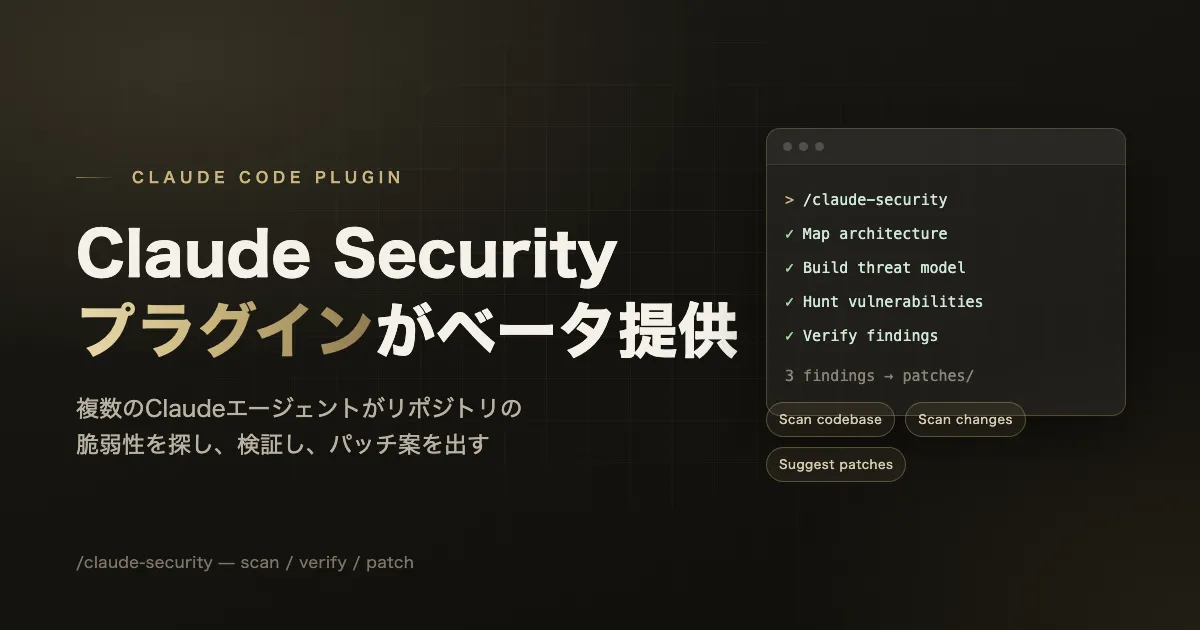
I came across the name “Claude Security” on Anthropic’s official site and, assuming it was a security feature released for Claude Code, checked the official documentation—only to find that the same name does not refer to a single thing. This article first sorts out the naming, and then, focusing on the “Claude Security” plugin offered in beta for Claude Code, summarizes how it works and how to use it in line with the official documentation.
The conclusion first — there are actually three “Claude Security” things
Looking at Anthropic’s site, there are three features with similar names and similar roles.
| Name | Where it runs | Target | Available plans |
|---|---|---|---|
| Claude Security (managed service) | claude.ai/security (from the web sidebar) | Continuous monitoring and periodic scanning of connected repositories | Enterprise (Team and Max to follow) |
| Claude Security plugin (the subject of this article) | Inside a Claude Code session, the /claude-security command | One-off scan of an entire repository, or of a diff (by branch, PR, or commit) | Claude Code v2.1.154 or later, all paid plans |
| security-guidance plugin | Inside a Claude Code session, runs automatically once installed | Review of code Claude wrote in that session—on edit, at the end of a turn, and at commit time | All plans |
The managed service and the plugin both go by “Claude Security,” but the official documentation clearly distinguishes the two.
If you want a managed service that monitors your repositories, see the Claude Security product, available on the Enterprise plan. The plugin reaches code the managed product can’t reach, such as repositories hosted on GitLab or Bitbucket, or on networks that don’t allow inbound connections.
(If you want a managed service that continuously monitors your repositories, see the Claude Security product, available on the Enterprise plan. The plugin also reaches code the managed service cannot, such as repositories hosted on GitLab or Bitbucket, or on networks that do not allow inbound connections.)
In other words, the plugin is the version that lets you run a one-off scan from your own machine (or a Claude Code session), regardless of where the repository is hosted. The rest of this article looks at that plugin.
Background — a continuation of the work from Claude Code Security
In its official blog, Anthropic also touches on the work that preceded Claude Security.
Recently, we made Claude Mythos Preview—which can match or surpass even elite human experts at both finding and exploiting software vulnerabilities—available to a number of partners as part of Project Glasswing. But our cybersecurity efforts go beyond Glasswing: with Claude Security, a much wider set of organizations can put our most powerful generally-available model, Claude Opus 4.7, to work across their codebases.
(Recently, as part of Project Glasswing, we made "Claude Mythos Preview"—which can match or surpass elite human experts at both finding and exploiting vulnerabilities—available to a number of partners. But our cybersecurity efforts do not stop at Glasswing. With Claude Security, a much wider set of organizations can put Claude Opus 4.7, the most powerful model currently generally available, to work across their entire codebases.)
According to the official blog, this managed service entered public beta for Enterprise customers on April 30, 2026, expanding to broader general availability after validation in a limited research preview by hundreds of organizations. The plugin now added to Claude Code is positioned as taking the detection methods cultivated through this work and making them usable as a one-off, regardless of where the repository is hosted.
How the plugin works — a scan by multiple agents
The Claude Security plugin runs a multi-agent scan of a repository inside a Claude Code session.
The Claude Security plugin runs a multi-agent vulnerability scan of your codebase inside a Claude Code session. A team of Claude agents maps your architecture, builds a threat model, hunts for vulnerabilities, and independently reviews every finding before writing the report.
(The Claude Security plugin runs a multi-agent vulnerability scan of your codebase inside a Claude Code session. A team of Claude agents maps your architecture, builds a threat model, hunts for vulnerabilities, and then independently reviews each finding before writing the report.)
According to the official product page, the intended targets are high-severity vulnerabilities that do not fit known patterns, such as memory corruption, injection, authentication bypass, and complex logic errors.[1] Because a different agent from the one that wrote a finding verifies it before it goes into the report, the scan results are not deterministic: it is explicitly stated that scanning the same code twice can surface different findings.
This plugin also has a role distinct from the other mechanisms built into Claude Code. It is separate from the security-guidance plugin, which reviews in real time as you edit; the /security-review command, which runs once against a branch; and Code Review, which runs on pull requests. Each differs in depth and in when it runs (see the mapping table later).
Prerequisites
The prerequisites listed in the official documentation are as follows.[2]
- Claude Code v2.1.154 or later and a paid plan (for the dynamic workflows used to orchestrate the scan; on the Pro plan, this must be enabled from the “Dynamic workflows” row in
/config) - Python 3.9.6 or later runnable as
python3on yourPATH(the plugin’s tools use only the Python standard library, so no additional installation is needed) - Linux, macOS, or Windows
- Git (needed for scanning diffs and creating patches; a full-repository scan itself works even in a directory without version control)
Installation
Install from the official marketplace within a Claude Code session.
/plugin install claude-security@claude-plugins-officialIf the marketplace is not found, add it first and try again.
/plugin marketplace add anthropics/claude-plugins-officialTo apply it without restarting after installation, run the following.
/reload-pluginsTo remove it, use the /plugin menu, or run claude plugin uninstall claude-security in the terminal.[2]
Usage — the three jobs of /claude-security
After installation, the /claude-security command is added; running it opens a menu. There are three jobs to choose from.[2]
- Scan codebase (scan the entire repository)
- Scan changes (scan a diff)
- Suggest patches (propose patches)
The basic flow is to scan the whole repository and then turn the findings into patches.
- Run
/claude-securityand choose Scan codebase - Choose the scan scope. The plugin first reads the repository and presents the whole repository or a narrowed scope, each with its file count and rough cost. If you answer “I don’t know,” it picks a reasonable default based on the repository’s size
- Confirm the run. A scan takes time, uses a fair number of tokens, and requires keeping Claude Code open until it completes, so nothing runs until you confirm
- Read the report. Each stage is reported as it progresses, and details can be checked with
/workflows. The results are saved to a timestamped directory inside the repository - Choose Suggest patches and select the findings you want to address
- Apply the patches you adopt yourself, each as a separate pull request (
git apply). Patches are never applied automatically
You can also specify a job directly as an argument without going through the menu (e.g., /claude-security scan my branch). You can also instruct it in natural language, such as “scan commit abc1234.” The plugin is said to be most effective in auto mode, where the agents can proceed without asking for permission at each step, and how to enable it is explained when a job starts.
Scanning only a diff
If there are commits ahead of the base branch, the /claude-security menu offers to scan only that diff. This is useful when you want to check a branch before merging. You can also specify an open pull request or a single commit (e.g., “scan commit abc1234”). However, only committed changes are scanned; work-in-progress changes must be committed or stashed, or you must run a full-repository scan that reads the working tree. Scanning a diff requires a Git repository, whereas a full-repository scan works even in a directory outside version control. Only the step of looking for open pull requests accesses the network, so it is offered only when the session has permission to run the gh command and is signed in to gh.[2]
Narrowing the scope on large repositories
On large repositories, it is recommended to scan one area at a time rather than the whole tree. If you choose one of the narrowed scopes the plugin presents—such as the API layer or authentication-related code—the run scales accordingly. The report’s “coverage” section records what was actually examined and what was not, so you can run a different area later as a separate scan.[2]
How to read the report
Each scan creates a directory named CLAUDE-SECURITY-<timestamp>/ inside the repository and writes the results there.[2]
CLAUDE-SECURITY-RESULTS.md: the main report. Each finding is given an ID such asF1, with its impact, exploitation scenario, severity, confidence, and recommended actionCLAUDE-SECURITY-RESULTS.jsonl: the same findings in a machine-readable format, one JSON object per lineCLAUDE-SECURITY-REVISION-<commit>.json: a “revision stamp” recording which commit was scanned, at what level of effort, whether work-in-progress changes were included, and how rigorously it was verified. If scanned outside version control,UNVERSIONEDis recorded instead of a commit
This directory is the only change the scan makes, and it has its own .gitignore, so even if you accidentally git add, the report will not slip into a commit. If you want to keep it in history for auditing, you can simply delete this .gitignore and commit the whole directory.
Because a finding goes into the report only after an independent verification agent has analyzed it, the report is said to be short and worth reading. On the other hand, the scan is not deterministic—scanning the same code twice can surface different findings—so it is recommended to run scans regularly and use the revision stamp to tie each report to the code and configuration it corresponds to.
Fixing the vulnerabilities found — how patch proposals work
Choose Suggest patches from the /claude-security menu, or ask something like “fix finding F3,” and you can select which finding in the report to address. Because patches are made against committed code, if that code has changed since the report was written, the finding is skipped and a new scan is proposed instead. Each patch is created on a working copy of the repository, so the original source files are not modified until you apply the patch.[2]
Before a patch reaches your hands, an agent other than the one that wrote it reviews it. If the code has tests, it actually runs those tests, and it reads the diff itself from its own perspective. A patch is written only when the following three points can be guaranteed.
- It addresses the finding in question
- It introduces no new vulnerabilities
- It changes no other behavior
If any of these cannot be guaranteed, instead of a patch, a short note explaining why is returned.
Applying a patch is always your decision.
(Whether or not to apply a patch is always the user's own decision.)
Patches are saved one at a time in the report’s patches/ folder, in the form F<n>.patch per finding, accompanied by a note explaining the change. Apply them from your own shell, or ask Claude to apply them and create a pull request.
git apply CLAUDE-SECURITY-<timestamp>/patches/F1.patchIf the target code has no tests, the note says so explicitly, making it clear that the review was done without running tests. Each patch is recommended to be applied as a separate pull request so it can be reviewed and tested individually.[2]
Where it sits among the other security features
The official documentation organizes the series of security features, including the Claude Security plugin, as part of defense in depth, as follows.[2]
| Stage | Feature | What it covers |
|---|---|---|
| In-session | security-guidance plugin | Fixes common vulnerabilities in the code Claude wrote, within the same session |
| On-demand, one-off | /security-review | A security check run once against the current branch |
| On-demand, deep scan | Claude Security plugin | Multi-agent scan of a repository or diff. Findings and patches are reviewed independently |
| At pull request | Code Review (Team and Enterprise plans) | Multi-agent review of correctness and security informed by the whole-repository context |
| Managed | Claude Security (Enterprise plan) | A hosted service that continuously monitors connected repositories |
| CI | Existing static analysis and dependency scanners | Per-language conventions, supply-chain checks, policy enforcement |
The documentation makes clear that this plugin does not replace existing security tools. It is intended to be used alongside static analysis, dependency scanning, and code review, with its complementary role being to reason about code like a human security researcher, in contrast to those tools that perform deterministic checks.
Summary
- The name “Claude Security” refers to both a managed service for the Enterprise plan (claude.ai/security, continuous monitoring) and a plugin for Claude Code (
/claude-security, one-off scan). The two are different, and the plugin also covers environments the managed service cannot reach, such as GitLab- or Bitbucket-hosted repositories or networks behind inbound firewall restrictions - With the plugin, multiple Claude agents map the architecture, build a threat model, and hunt for vulnerabilities, and an agent other than the one that wrote a finding independently verifies it before it goes into the report. As a result, the scan is not deterministic and can produce different results on each run for the same code
- The prerequisites are Claude Code v2.1.154 or later and a paid plan (Pro must enable dynamic workflows in
/config), Python 3.9.6 or later aspython3, and Git (for diffs and patches) - Installation is
/plugin install claude-security@claude-plugins-official→/reload-plugins. The basic usage flow is “Scan codebase” → “Suggest patches” from the/claude-securitymenu - Results are saved to a
CLAUDE-SECURITY-<timestamp>/directory inside the repository, and a dedicated.gitignoreprevents them from being accidentally included in a commit - Patches are presented only after review by an independent agent, but applying them is always the user’s own decision, and no automatic application is performed
- It has a role distinct from the security-guidance plugin,
/security-review, Code Review, the managed Claude Security, and CI static analysis tools, and is officially positioned as not replacing existing security tools
References
- Claude Security — Claude by Anthropic. Examples of targeted vulnerabilities include memory corruption, injection, authentication bypass, and complex logic errors. (Verified July 23, 2026)
- Scan your codebase for vulnerabilities — Claude Code Docs. The main source for this article’s usage details: the prerequisites (Claude Code v2.1.154 or later, Python 3.9.6 or later, Git), installation steps, the three jobs of
/claude-security, the report’s directory structure, how patch proposals work, and the mapping table against the other security features. (Verified July 23, 2026) - Claude Security is now in public beta — Claude by Anthropic. (Verified July 23, 2026. First published April 30, 2026; updated June 21, 2026)
- Catch security issues as Claude writes code — Claude Code Docs. (Verified July 23, 2026. Specification of the security-guidance plugin)