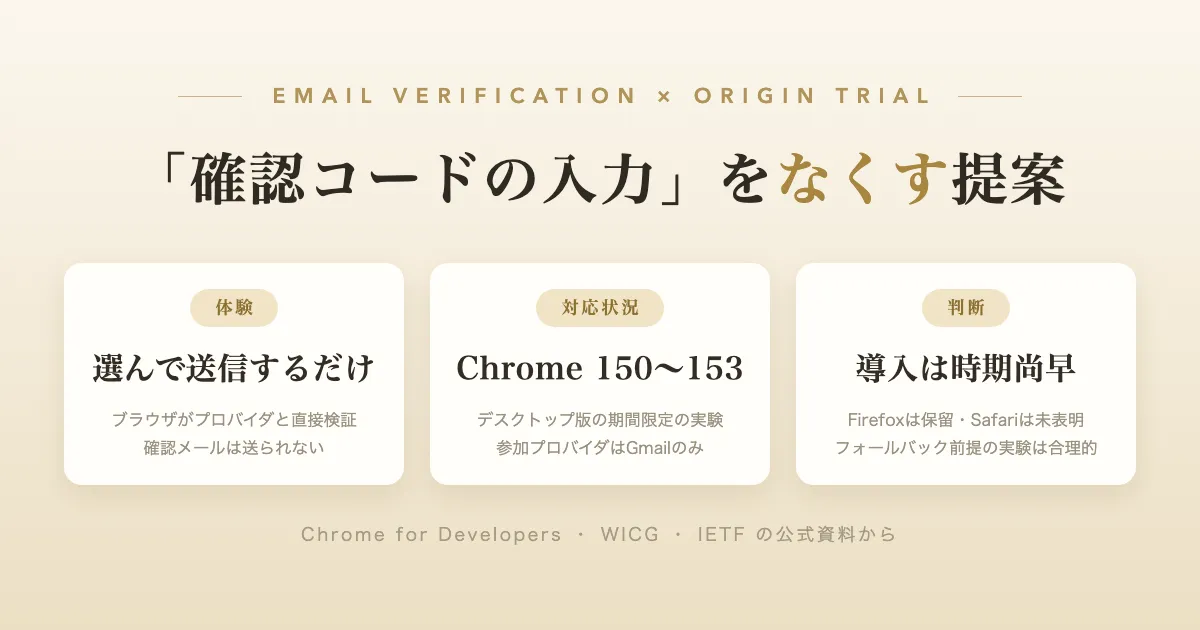
You enter your email address on a sign-up or inquiry form, and you are asked to check your inbox: “We’ve sent you a verification code.” This round trip is a procedure widely used for identity verification on the Web. On July 8, 2026, Chrome’s developer blog announced the start of an origin trial (a Chrome mechanism that lets you take part in time-limited experiments on production sites) for a proposal that removes this round trip entirely: the “Email Verification Protocol (EVP).” Drawing on Chrome’s official blog, the draft specifications, and the official positions of each browser vendor as sources, this article lays out an overview of EVP, how the user experience changes, and the current state of browser support, then considers whether this technology should be adopted at present (all the conditions described were verified on July 12, 2026).
The conclusion first — production adoption is premature; “watch closely” is the sound call
Let me state the judgment up front. At this point, EVP is not at a stage where it should be adopted as a production authentication flow. The reasons are as follows.
- What currently works is only the origin trial in desktop Chrome, covering Chrome 150–153. The experiment is time-limited, running until roughly early September 2026
- The specification is still being drafted, and backward-incompatible changes have been officially announced
- It is a mechanism that requires support on the email provider’s side, yet the only provider that has announced participation is Gmail
- Other browsers have not followed suit: Mozilla has marked it “defer” (judgment reserved), and WebKit (Safari) has expressed no position
At the same time, EVP is designed as a “layer on top” (progressive enhancement) that simply falls back to the conventional verification flow if no token arrives, so the risk of merely trying it is kept small. For a service where drop-off at the verification-code step has become a problem, there is a reasonable case for taking part in the experiment while keeping the fallback in place. Let us look at each point in turn.
What is the Email Verification Protocol
Chrome’s official blog explains the proposal as follows.
The Email Verification API is a proposal that allows the browser to communicate directly with the email provider to verify that the user owns the email address. Users select an email from the browser’s autofill or autocomplete suggestion, submit the form, and the site verifies the email address with the provider without sending an email or interrupting the user’s flow.
(The Email Verification API is a proposal that allows the browser to communicate directly with the email provider to verify that the user owns the email address. Users select an email from the browser's autofill or autocomplete suggestion, submit the form, and the site verifies the email address with the provider without sending an email or interrupting the user's flow.)
In short, it is a proposal to replace the ownership verification that has until now been done through “sending a verification email and acting in the inbox” with a cryptographic exchange between the browser and the email provider. Following feedback from the W3C TAG (Technical Architecture Group), the specification is split into two parts: the browser-side API is proposed in the WICG (Web Incubator Community Group), and the provider-side protocol is proposed as an IETF Internet-Draft.
The three parties involved
- Verifier — the site that collects an email address and wants to verify it
- Email Provider — the mail service for that address (e.g., gmail.com)
- Issuer — the service that manages the account for that email (e.g., accounts.google.com)
The verification flow
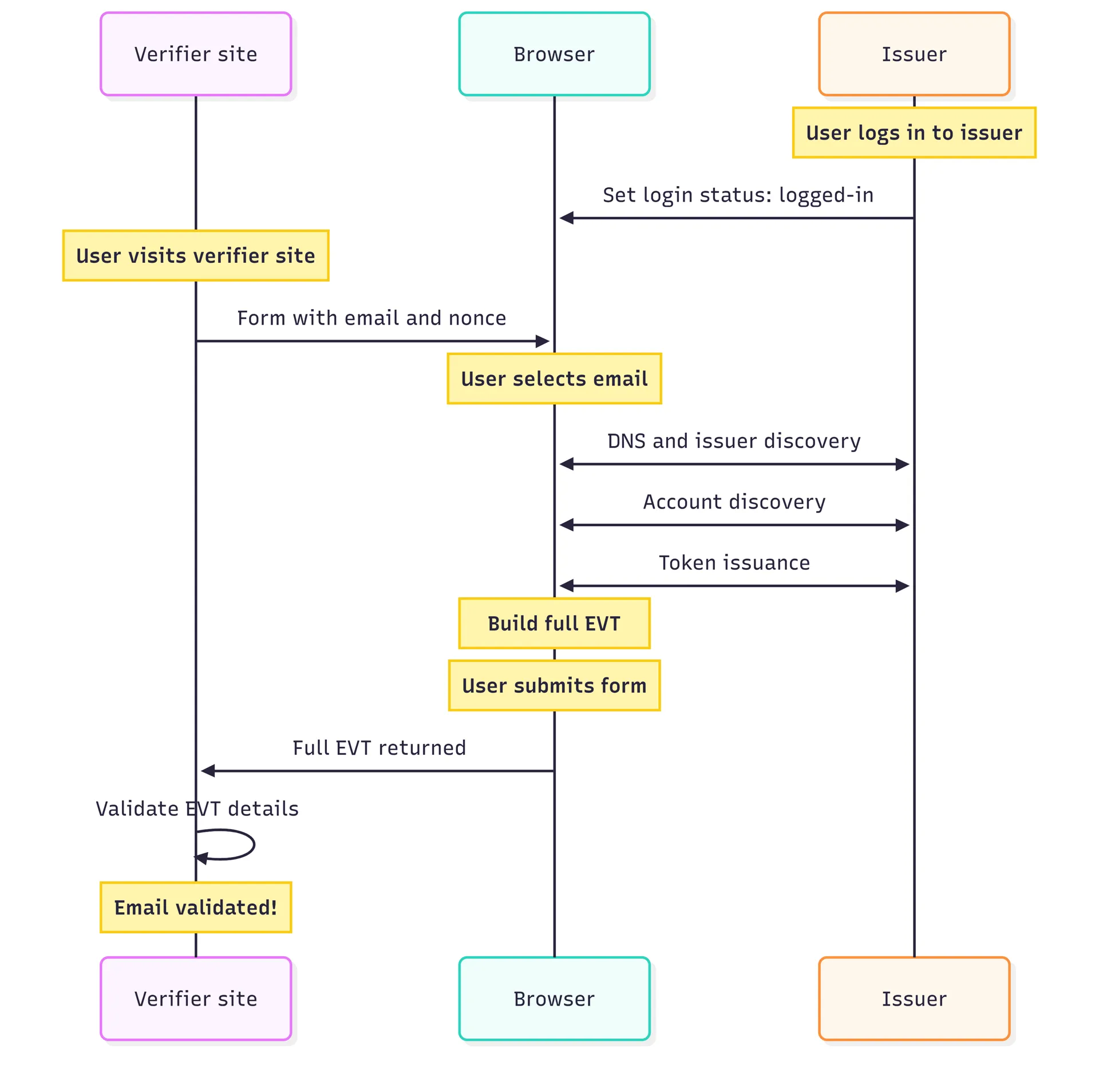
Figure 1: The overall flow of the Email Verification Protocol (source: Chrome for Developers blog, CC BY 4.0)
- In the form’s email field, the user selects their own address from the autofill/autocomplete suggestions. The form includes a hidden field carrying a single-use value (nonce) that the site has prepared
- The browser looks up the DNS record for the address’s domain (the TXT record at
_email-verification.<domain>) to identify the Issuer, and confirms whether the Issuer holds a valid session for that address - The Issuer issues an Email Verification Token (EVT) for that address. The browser adds the site’s origin and the form’s nonce to the EVT and packages it into a signed JWT (SD-JWT+KB, RFC 9901)
- On form submission, this token goes into the hidden field and is passed to the site, and the site verifies the address, the nonce, and the signatures of the browser and Issuer
For the Issuer-side discovery and account confirmation, the foundations of the existing FedCM (Federated Credential Management) API — .well-known/web-identity, the accounts endpoint, and the Login Status API — are reused.
The privacy design
The information each party learns during the exchange is limited. The official blog states the following.
These requests don’t reveal any additional information about the user. The verifier site does not receive information during this step. The issuer only sees a request to verify the user exists; it does not see which site initiated the request.
(These requests don't reveal any additional information about the user. The verifier site does not receive information during this step. The issuer only sees a request to verify the user exists; it does not see which site initiated the request.)
Also, when an address is used for verification for the first time, a permission prompt is shown just once, and verified addresses can be managed from Chrome’s settings (chrome://settings/contactInfo).
What it guarantees and what it does not
What requires care is that EVP confirms “that the user holds a valid session with the provider of that address,” not the deliverability of email.
Email verification confirms that the user has an active session with the provider of their email address. It does not verify that your email reached the user.
(Email verification confirms that the user has an active session with the provider of their email address. It does not verify that your email reached the user.)
Whether a welcome email or subsequent notifications actually arrive is a separate matter, and if necessary you will confirm it by sending mail as before.
How the user experience changes
Conventional email verification is roughly the following sequence.
- Enter an email address in the form and submit
- The site sends a verification email
- The user leaves the site and opens their inbox (switching to another app or tab; sometimes a search through the spam folder is required)
- Transcribe the verification code (OTP) or click the link (magic link)
- Return to the original site and continue
The official blog describes the problem with this sequence as the risk of leaving the site.
Existing verification methods, like one-time passwords (OTPs) or email verification links (magic links), require the user to navigate away from your site. This disruptive process can increase the risk of the user, whether a human or an agent, abandoning their session entirely and never completing their authentication process.
(Existing verification methods, like one-time passwords (OTPs) or email verification links (magic links), require the user to navigate away from your site. This disruptive process can increase the risk of the user, whether a human or an agent, abandoning their session entirely and never completing their authentication process.)
In an environment where EVP works, these five steps become the following two.
- Select your own email address from the autofill suggestions in the form (only the first time you use that address, respond once to a permission prompt)
- Submit the form. After submission, a small notice appears saying “the provider has verified the address”
The user never leaves the site once, and no verification email is sent. The steps of opening the inbox, transcribing a code, and searching the spam folder disappear from the experience.
That said, this experience has preconditions.
- You must already be logged in to the email provider (Issuer) in the same browser profile. For Gmail, you must be logged in to that Google account
- You must select the address from the autofill/autocomplete suggestions. Support for manually typed addresses is said to be planned for a future release and is out of scope at present
From the site implementer’s viewpoint, the entry point is two lines of HTML.
<input name="email-address" type="email" autocomplete="email">
<input type="hidden" name="token" nonce="rAnD0m-VaLuE"
       autocomplete="email-verification-token">
Only when a supported browser, a supported provider, and the login state all come together does a token enter the hidden field; if it does not, the site sends a verification email as before. No feature-detection API is provided, and the official guidance is to treat it as “verify if a token arrives, and fall back if it does not.” It is a design that can be layered on top without breaking the existing flow.
Note that public demos (a verifier-side demo and a mock-provider demo by the article’s author) are provided, letting you experience the flow before joining the origin trial. It is said you can try it even with a Gmail address as long as you are logged in to the Google account.
The current state of support (as of July 12, 2026)
| Target | Status |
|---|---|
| Chrome | Origin trial underway. Covers Chrome 150–153 (planned), desktop only |
| Email provider | Gmail is participating. No other provider announcing participation could be confirmed on the official blog |
| Firefox (Mozilla) | Official position is “defer” (judgment reserved, January 2026) |
| Safari (WebKit) | No official position expressed (the position-request issue remains open) |
| Standardization | A WICG proposal plus an IETF Internet-Draft. Neither a W3C Recommendation nor an RFC |
Chrome — a “time-limited experiment” called an origin trial
According to the Intent to Experiment (the formal proposal to run the experiment) on the blink-dev mailing list, the origin trial covers Chrome 150 through 153, desktop only at first, with Android to follow (provision in WebView is said to be undecided). The stable release of Chrome 153 is scheduled for September 8, 2026 (Chromium Dash), so the experiment period is roughly two and a half months.
What is important is that the origin trial is designed “to prevent dependence on a pre-release feature.” The official blog itself makes clear that there are traffic limits, and that one should expect backward-incompatible changes to the Issuer-side API (a move to application/json for the request format, a switch to HTTP Message Signatures, and changes to the Chrome-side UX).
Mozilla (Firefox) — “defer”
In Mozilla’s standards position, a position request was filed in November 2025 and was recorded as “defer” (judgment reserved) in January 2026. The reviewer cited that the explainer lacks detail on the problem framing and on comparisons with other solutions (such as OpenID Connect and Passkeys), making a qualitative judgment impossible. This is not a statement of opposition, but neither is it support. Google subsequently updated the explainer and specification and states in the Intent to Experiment that it plans to request another review.
WebKit (Safari) — no position expressed
WebKit’s standards-position issue has remained open since November 2025, and as of July 12, 2026, no official position from Apple has been posted. Note that Google’s Intent to Experiment records that at TPAC (the W3C’s annual meeting) WebKit gave informal feedback to the effect that it “would prefer extending WebOTP or leveraging IMAP clients, rather than email providers,” but this is Google’s account, not WebKit’s official position — a point that requires care.
The stage of standardization
The browser-API side is a draft in the WICG (an incubation body that precedes formal W3C standardization), and the provider-side protocol is an IETF Internet-Draft filed under an individual’s name (draft-hardt-email-verification-00). Google reports that the result of the W3C TAG’s early review was “ambivalent” (reserving for and against). Neither has reached the stage of being agreed as a standard that multiple browsers implement.
Should this technology be adopted at present
Taking the above into account, here is the judgment. What matters in an adoption decision is not only “does it work now” but will it keep working after the experiment ends, is the specification stable, and can multiple implementations be expected.
Adoption as a production authentication flow (a design change premised on abolishing or reducing verification emails) is premature. The reasons are as listed in the conclusion, but two points weigh especially heavily. First, the origin trial has a deadline of early September 2026 (Chrome 153) and is subject to traffic limits — an “experiment designed not to create dependence.” Second, the conditions under which it functions are currently quite narrow. It works only when all of the following are met: desktop Chrome, a Gmail (or supported provider) address, already logged in to that account, and selected from autofill — and mobile is out of scope. On general-audience Japanese sites, where a large share of use comes via smartphones, the users who can benefit are even more limited.
On the other hand, “joining the experiment” while keeping the fallback in place is a different judgment. EVP is designed as a layer on top of the conventional flow, and since nothing happens if no token arrives, there is almost nothing to lose by adopting it. For a service that actually measures drop-off due to verification codes in its sign-up or purchase funnel, there is a reasonable case for registering for the origin trial and measuring the effect within an A/B testing framework (the official blog also describes integrating it into an A/B testing setup). We are now at the stage where feedback is being reflected into the specification, and participation by operators who hold real data is welcomed.
Future developments can be tracked via the official evp-announce mailing list and Chrome Platform Status.
Summary
- The Email Verification Protocol (EVP) is a proposal in which the browser communicates directly with the email provider to verify ownership of an email address, making verification codes (OTPs) and magic links unnecessary
- The user’s action becomes simply “select an address from autofill and submit,” with no need to leave the site. However, what is verified is “a valid session with the provider,” not email deliverability
- As of July 12, 2026, what works is only the origin trial in desktop Chrome (Chrome 150–153 planned), and the only provider announcing participation is Gmail. Mozilla has marked it “defer,” WebKit has expressed no position, and backward-incompatible changes to the specification have been announced
- Therefore, adoption as a production authentication flow is premature. For a service where drop-off at the verification-code step is a problem, taking part in the experiment while keeping the fallback in place is reasonable
References
- Test the Email Verification Protocol with an origin trial — Chrome for Developers (July 8, 2026) — the primary source for this article. Figure 1 is quoted from this article (the text is CC BY 4.0, the code samples are under the Apache 2.0 license)
- Modernize authentication with passkeys, digital credentials, and more — Chrome for Developers
- Email Verification explainer — WICG
- Email Verification API (Draft Community Group Report) — WICG
- The Email Verification Protocol (draft-hardt-email-verification-00) — IETF Internet-Draft
- RFC 9901: Selective Disclosure for JSON Web Tokens — IETF
- Intent to Experiment: Email Verification Protocol — blink-dev (May 19, 2026)
- Email Verification Protocol — Chrome Platform Status
- Email Verification Protocol — mozilla/standards-positions #1316
- Email Verification Protocol — WebKit/standards-positions #578
- Getting started with origin trials — Chrome for Developers
- Chrome release schedule — Chromium Dash
- evp-announce — chromium.org mailing list