“Designing a loop” is a convenient expression, but in practice different people mean slightly different things by it. Sometimes it refers simply to sending a prompt repeatedly; other times it means handing work to Claude with a completion condition, or even scheduled execution and autonomous, repeated processing. On July 7, 2026, the Claude Code team published an explanatory post (written by Delba Oliveira) on the official developer account @ClaudeDevs that addresses this ambiguity. This article organizes its contents, supplementing the specifications with the official Claude Code documentation.
Defining a Loop — “Repeating Cycles of Work Until a Stop Condition Is Met”
The Claude Code team defines a loop as follows.
On the Claude Code team, we define loops as agents repeating cycles of work until a stop condition is met.
(On the Claude Code team, loops are defined as "agents repeating cycles of work until a stop condition is met.")
On that basis, the team classifies loops along the following three axes.
- How it is triggered (the trigger)
- How it stops (the stop condition)
- Which Claude Code feature (primitive) it uses
The original post cautions that “not every task needs a complex loop. Start with the simplest approach, and use these patterns selectively.” Below, we look at the four loop types in turn.
Conclusion — Four Loop Types and When to Use Each
| Loop type | Trigger | Stop condition | Well suited for |
|---|---|---|---|
| Turn-based | A user prompt | Claude judges the task complete, or determines it needs additional context | Relatively short work that is not part of routine or scheduled operations |
Goal-based (/goal) | A real-time manual prompt | The goal is achieved, or a configured maximum turn count is reached | Work with a verifiable exit condition |
Time-based (/loop, /schedule) | A specified time interval | User interruption, or completion of the work (a PR merged, a queue emptied, etc.) | Recurring work, and interaction with external systems |
| Proactive | An event or a schedule (no human intervenes in real time) | Each individual task ends when its goal is achieved. The routine itself continues until turned off | Well-defined, repetitive work such as bug reports, issue triage, migrations, and dependency updates |
Turn-Based Loops — The Basic Form of Claude Code
Each prompt you send starts a manual loop. Claude gathers context, takes action, verifies the result, repeats if necessary, and finally responds. This sequence is called the agent loop.
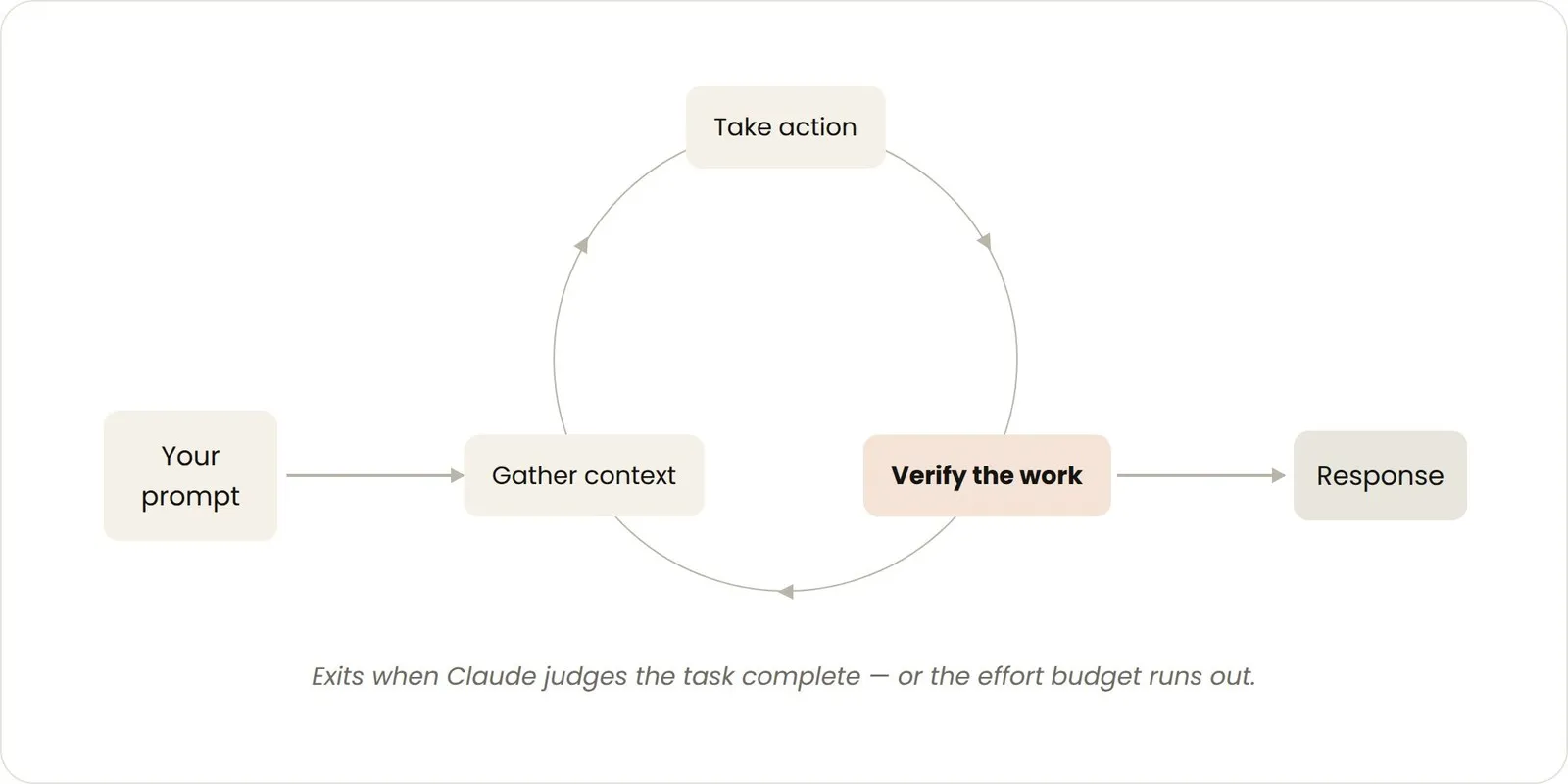
Figure 1: The turn-based loop (the agent loop). It is exited when Claude judges the task complete or the effort budget is exhausted.
For example, if you ask it to “build a like button,” Claude reads the code, makes edits, runs tests, and returns what it judges to be working. The verification that follows and the writing of the next prompt are then done manually by the user.
This verification step can be improved by writing the procedure out explicitly as a SKILL.md. If you describe as a skill the checks you were doing by hand, Claude can verify more of the work on its own, all the way to the end. The example the post gives is a skill that keeps Claude from reporting a UI change complete on the basis of “the edit succeeded” alone—instead defining a procedure of starting the dev server, actually operating the change, checking the browser console for errors, and measuring Core Web Vitals. Giving Claude tools and connectors that let it see and measure results, and making the check items as quantitative as possible, are said to be the knack for making Claude’s self-verification easier.
Goal-Based Loops (/goal) — Handing Over a Completion Condition
Some work does not finish in a single turn. For complex tasks in particular, things go better when Claude can iterate. /goal extends the period over which Claude keeps iterating by defining “what counts as done.”
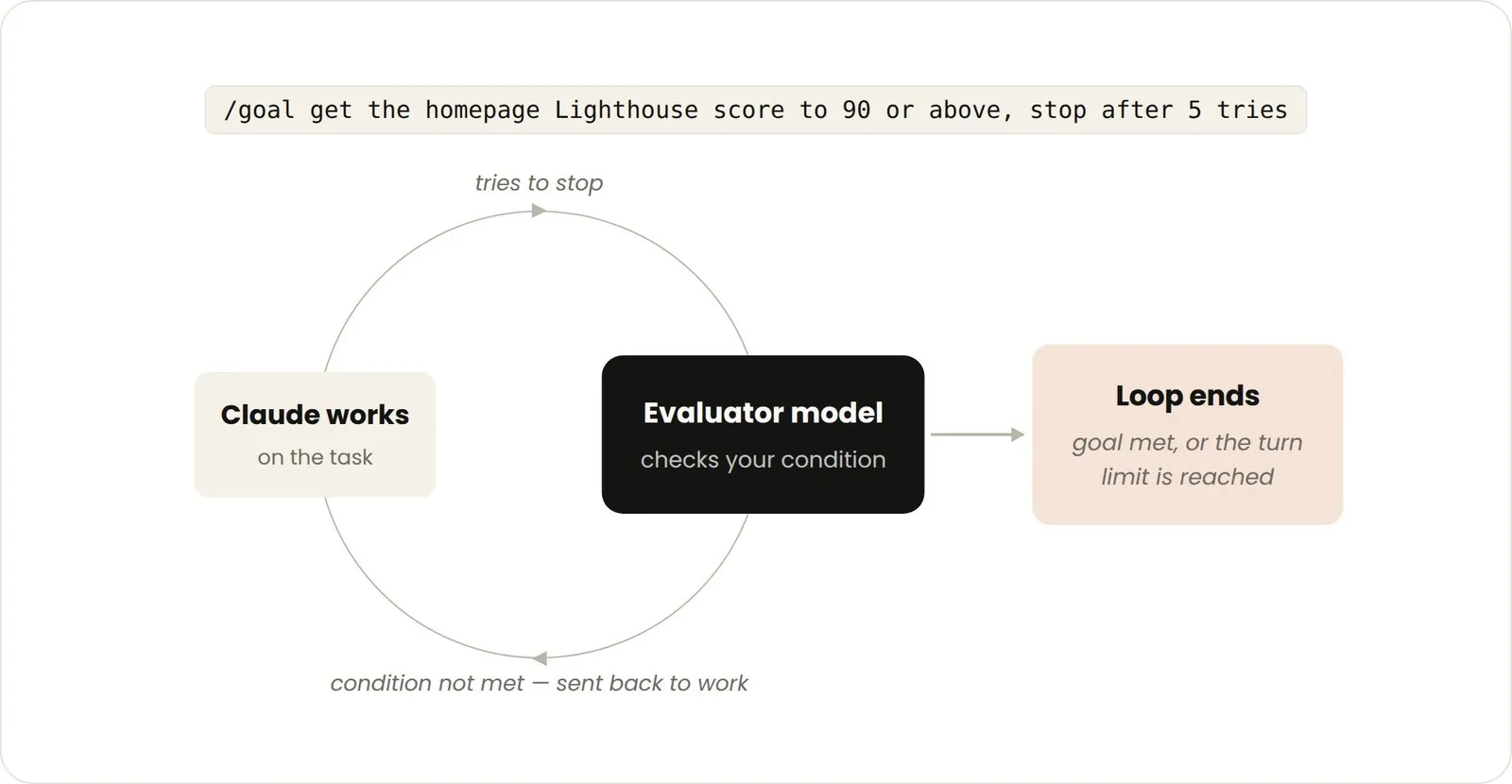
Figure 2: The goal-based loop. An evaluator model checks the condition every turn and sends the work back if it is not met.
By defining a success condition up front, Claude no longer has to judge on the spot whether “this is good enough” and cut the loop short prematurely. Each time Claude tries to stop working, the evaluator model checks the configured condition and sends the work back until the goal is met or the specified turn count is reached. According to the official documentation, this evaluator uses a small, fast model such as Haiku by default, makes its judgment against the conversation transcript alone (it does not call tools itself to verify), and the tokens spent on evaluation are usually negligible compared with the consumption of the main turns (Reference 1).
For this reason, deterministic conditions—such as the number of tests passed or a score exceeding a threshold—are said to be effective. The example the original post gives is as follows.
/goal get the homepage Lighthouse score to 90 or above, stop after 5 tries.Time-Based Loops (/loop, /schedule) — Recurring Execution and Integration with External Systems
Some of an agent’s work recurs on a regular basis. For example, in the task of summarizing Slack messages every morning, the content of the task is the same and only the input changes. There is also work that depends on external systems—such as a PR receiving review comments or CI failing. In such cases, checking at a fixed interval and reacting to changes makes for a simple interface.
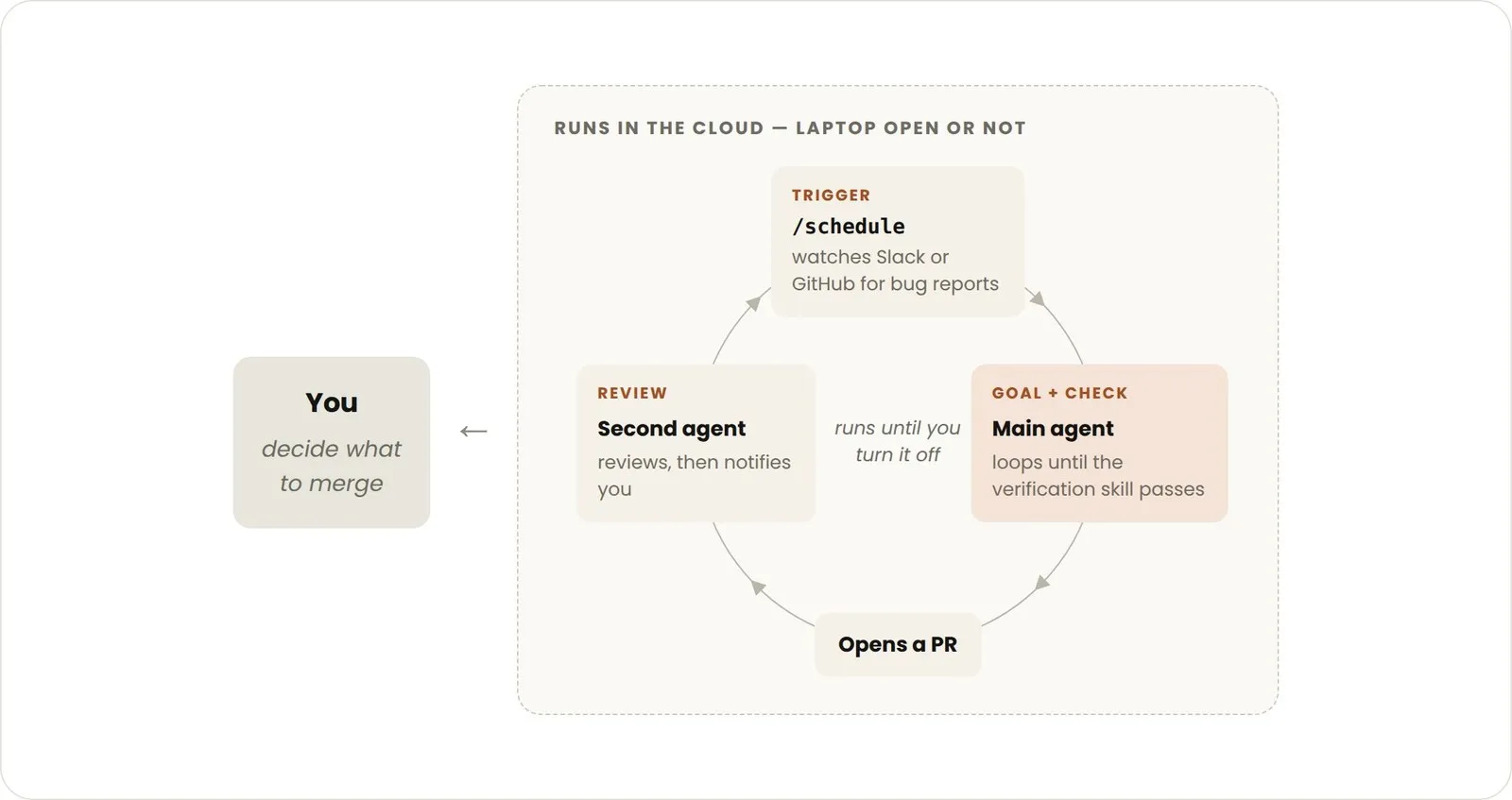
Figure 3: An example of moving a time-based loop to the cloud. The trigger, execution, and review all complete as a `/schedule` routine, and the user only makes the final merge decision.
/loop is a command that re-runs a prompt at a fixed interval.
/loop 5m check my PR, address review comments, and fix failing CIThe original post says that “because /loop runs on the user’s machine, stopping it stops the loop. Creating a routine with /schedule moves the loop to the cloud.” Comparing the two in the official documentation, there are the following differences (Reference 2).
Cloud (Routines, created with /schedule) | /loop (local) | |
|---|---|---|
| Execution environment | Anthropic’s cloud | Your own machine |
| Does the machine need to be running? | No | Yes |
| Does a session need to stay open? | No | Yes |
| Access to local files | No (a clean clone) | Yes |
| Minimum interval | 1 hour | 1 minute |
The original post also annotates /schedule as a “research preview.” Looking at the official documentation, /loop, which runs within a session, and scheduled tasks are presented as features available from Claude Code v2.1.72 onward. Routines that run on Anthropic-managed cloud, on the other hand, are still explicitly marked as a research preview at present (Reference 3). It therefore seems wise to understand /loop and cloud Routines as differing not only in execution environment but also in how their stability is positioned.
Proactive Loops — A Combination of the Above
In addition to the primitives above, combining other Claude Code features such as auto mode and dynamic workflows lets you compose long-running work into a single loop. Dynamic workflows is a feature in which Claude writes a JavaScript script to orchestrate many subagents; according to the official documentation, it is available from Claude Code v2.1.154 onward, on all paid plans, the Anthropic API, and elsewhere (Reference 4).
For example, in responding to incoming feedback, the original post cites the following combination.
/schedule— run a routine that checks for new reports/goal— document the definition of completion and the procedure that verifies it as a skill- dynamic workflows — direct the agents that triage, fix, and review each report
- auto mode — run the routine without stopping to ask for permission
Put together, this becomes a prompt like the following.
/schedule every hour: check the project-feedback channel for bug reports. /goal: don't stop until every report found this run is triaged, actioned, and responded to. When fixing a bug, use a workflow to explore three solutions in parallel worktrees and have a judge adversarially review them.Keeping Code Quality High
The quality of a loop’s output is said to depend on the machinery surrounding it. As points to consider when designing, the original post cites the following.
- Keep the codebase itself tidy: Claude follows existing patterns and conventions
- Give Claude a means to verify its own work: write out what counts as “good” as a skill
- Keep documentation within reach: make it possible to reference the latest best practices for frameworks and libraries
- Use a separate agent for code review: a reviewer with fresh context has less bias and is not dragged along by the main agent’s reasoning. You can use the built-in
/code-reviewskill or Code Review for GitHub - When an individual result falls short of the bar, rather than just patching it as a stopgap, try to improve the machinery itself for the benefit of every subsequent iteration
Managing Token Consumption
To manage a loop’s token consumption, it is said to be important to set clear boundaries.
- Choose the primitive and model that fit the work: small work does not need multiple agents or loops. Some tasks are fine with a cheaper, faster model
- Define success and stop conditions clearly: by making concrete what “done” is, Claude can arrive at a solution sooner (but not too soon)
- Try at small scale before a large run: dynamic workflows can spawn hundreds of agents. Measure consumption on part of the work first
- Use scripts for deterministic work: running a script is cheaper than reasoning through the steps each time. For example, a PDF-manipulation skill can bundle a form-filling script that is simply executed, rather than having the code re-derived every time
- Do not run routines more often than necessary: match the interval to how often the thing being watched changes
- Check your usage:
/usageshows recent usage by skill, subagent, and MCP;/goalwith no arguments shows the turn count and token consumption so far;/workflowsshows the token consumption of each agent, and you can stop an agent at any time
A First Step
The original post summarizes the four loop types as follows.
| Loop type | What you let go of | When to use it | What it uses |
|---|---|---|---|
| Turn-based | The checking work | While exploring or deciding | Customizing verification skills |
| Goal-based | Judging the stop condition | When you know what “done” looks like | /goal |
| Time-based | The timing of the trigger | When work happens outside the project or on a schedule | /loop, /schedule |
| Proactive | The prompt itself | When work is repetitive and well defined | All of the above, plus dynamic workflows |
To get started with loops, it is suggested to pick one task from the work you already do where you are the bottleneck, and to ask which part you can let go of—Can you write the verification checks yourself? Is the goal clear enough? Does the work happen on a schedule? Once you have decided on an approach, you are encouraged to actually run the loop, observe where it stops and where it overdoes things, and adjust without hesitation.
Summary
- The Claude Code team defines a loop as “agents repeating cycles of work until a stop condition is met,” and classifies loops into four types along three axes: trigger, stop condition, and the feature used
- Turn-based loops have the single prompt as their unit and stop based on whether Claude judges the task complete. Writing out verification as a
SKILL.mdwidens the scope of self-verification - Goal-based loops (
/goal) hand over a completion condition, and an evaluator model (a small, fast model by default) checks the condition every turn. The more deterministic the condition, the more effective - Time-based loops (
/loop,/schedule) run at a fixed interval./loopis tied to a local session, while the cloud Routines created with/scheduledo not require the machine to be running. However, Routines are still explicitly marked as a research preview at present, and their stability is positioned differently from/loop - Proactive loops combine the above with auto mode and dynamic workflows to compose repetitive work in which no human intervenes in real time
- Not every task needs a complex loop; starting with the simplest approach is recommended
References
- Keep Claude working toward a goal — Claude Code Docs. That the evaluator uses a small, fast model (Haiku) by default (“sent to your configured small fast model, which defaults to Haiku”); that the evaluator does not call tools and judges only against the conversation transcript; that
/goalrequires v2.1.139 or later; and so on. (Referenced in the section on goal-based loops.) - Run prompts on a schedule — Claude Code Docs. The comparison table of cloud (Routines), desktop, and
/loop; the minimum intervals (cloud 1 hour,/loop1 minute); that/looprequires Claude Code v2.1.72 or later; and so on. (Referenced in the section on time-based loops.) - Automate work with routines — Claude Code Docs. The explicit statement that “Routines are in research preview. Behavior, limits, and the API surface may change.”; that they run on Anthropic-managed cloud infrastructure, can be triggered by a schedule, the API, or GitHub events, and can also be created from the CLI’s
/schedule; and so on. (Referenced in the section on time-based loops.) - Orchestrate subagents at scale with dynamic workflows — Claude Code Docs. That dynamic workflows is available from Claude Code v2.1.154 onward, on all paid plans, the Anthropic API, and elsewhere; and so on. (Referenced in the section on proactive loops.)
- Getting started with loops — @ClaudeDevs on X (July 7, 2026, written by Delba Oliveira) — the primary source for this article. All figures shown are quoted from that post (figures by Anthropic)
- Keep Claude working toward a goal — Claude Code Docs
- Run prompts on a schedule — Claude Code Docs
- Automate work with routines — Claude Code Docs
- Orchestrate subagents at scale with dynamic workflows — Claude Code Docs