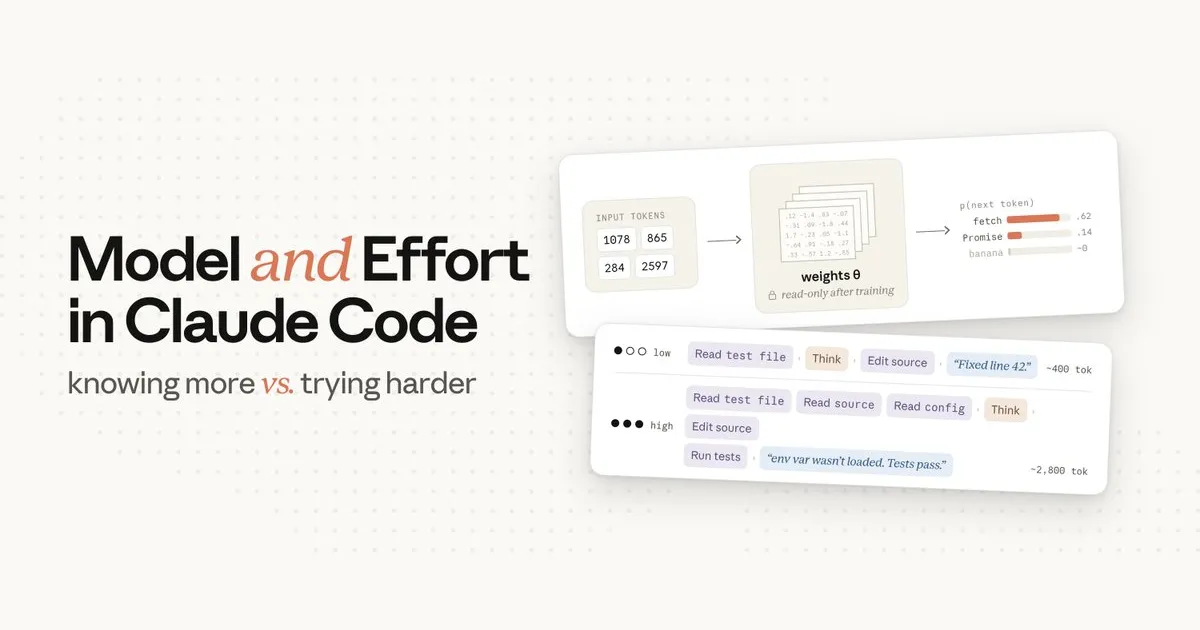
I use Claude Code in my daily work, but among its settings, “model” and “effort” both looked as though turning either up would make it smarter, and for a long time I used them without a clear sense of what actually changes and how. On July 9, 2026, Lydia Hallie of the Claude Code team published a post on the official developer account @ClaudeDevs explaining the difference between these two settings at the level of how they work. This article organizes that content, supplemented by Anthropic’s API documentation and the Claude Code documentation. All of the figures shown below appeared in that same post (illustrations by Anthropic).
Conclusion — model is “what it knows,” effort is “how much it works”
| Setting | What changes | What stays the same |
|---|---|---|
| model | The set of trained “weights” that handles the response (= its knowledge and ability), and the per-token price | The number of tokens generated |
| effort | The amount of work spent on a single task (length of thinking, number of files read, thoroughness of verification) | The model’s knowledge and ability themselves |
The original post’s title is “Model and effort in Claude Code: knowing more vs. trying harder,” and the conclusion is captured in a single sentence.
Effort changes how much work Claude does. The model changes what Claude knows.
(effort changes how much work Claude does; model changes what Claude knows)
Below, we look in turn at which stage of processing each setting affects.
How model works — a setting that swaps out the entire set of responding “weights”
When you press Enter, Claude Code bundles the message body together with the system prompt, tool definitions, CLAUDE.md, conversation history, and the files in context, and sends them as a single API request. model and effort are parameters specified within that request.
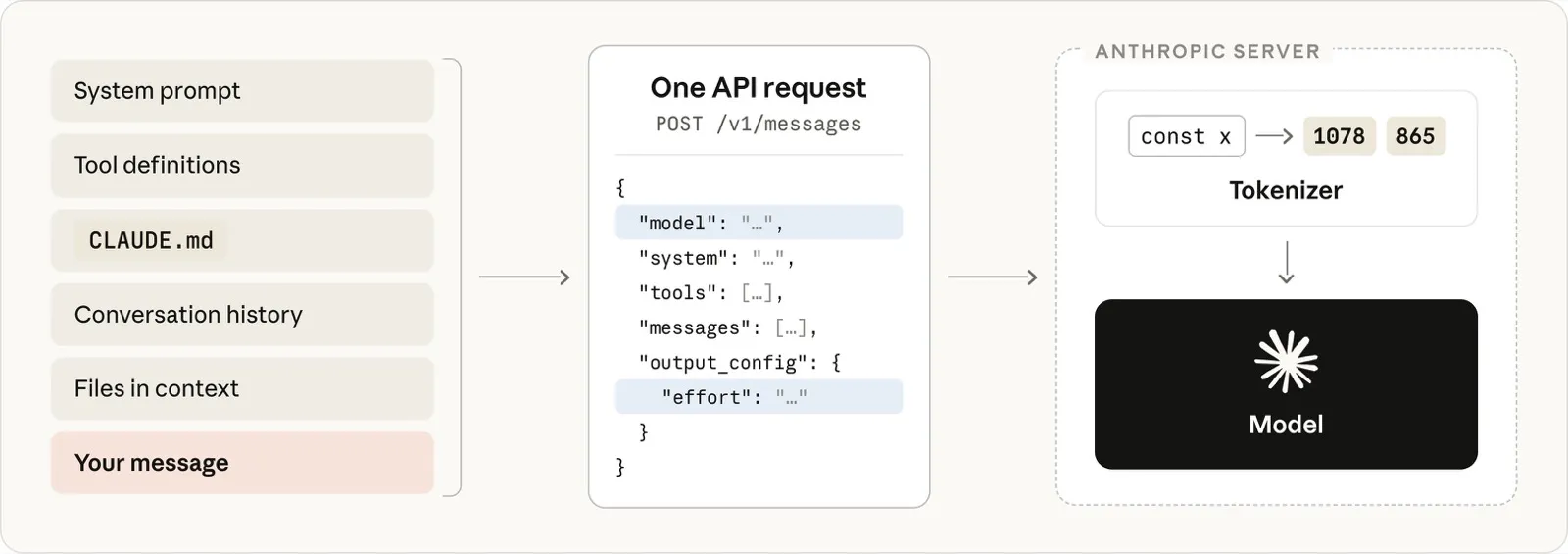
Figure 1: All input is bundled into a single API request, tokenized on the server side, and then handed to the model. model and effort are items specified within this request
The model does not read this text as-is. The first thing done on the server side is tokenization: the text is split into fragments, and each fragment is mapped to an integer within the vocabulary fixed at the model’s training time (100,257 words in the figure’s example). From there on, the prompt is treated as an array of integers.
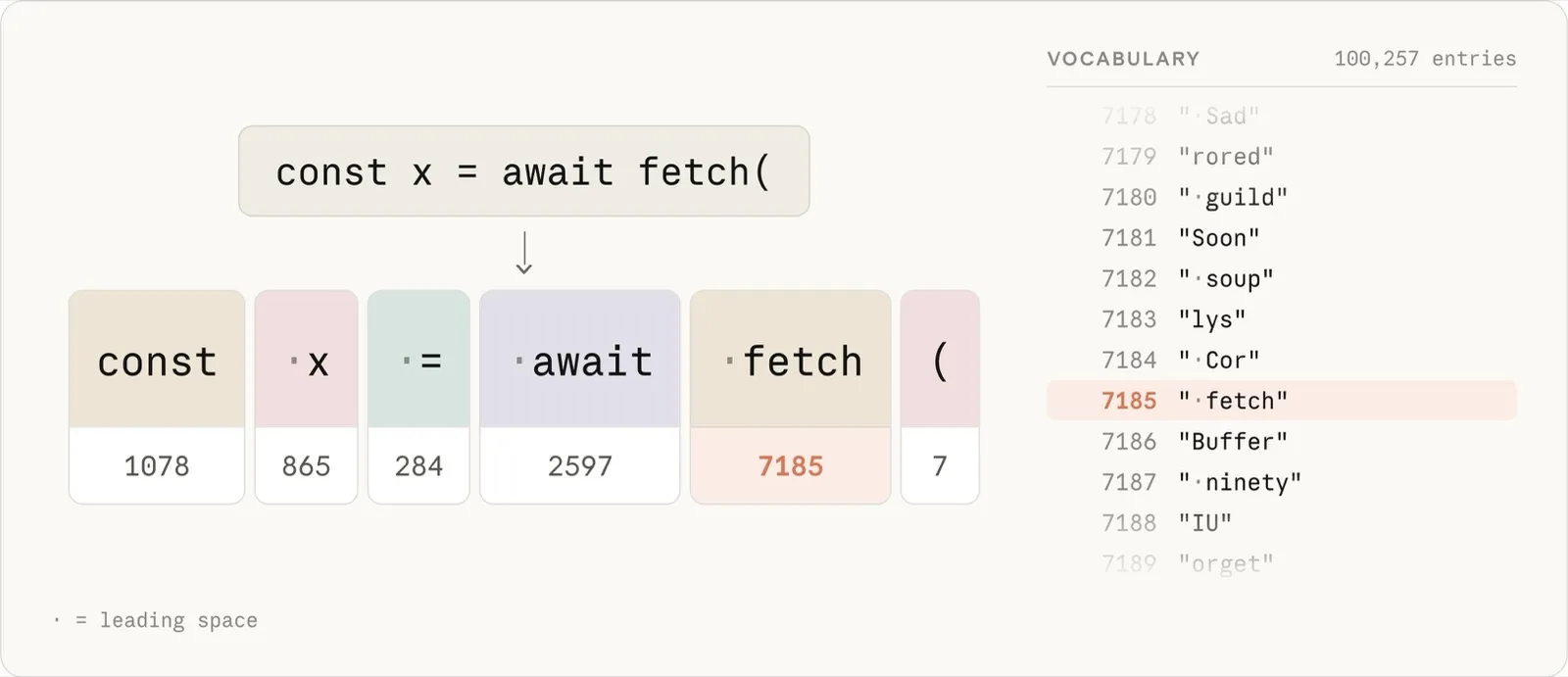
Figure 2: The tokenizer splits text into fragments and maps them to integer IDs in a fixed vocabulary (the IDs in the figure are illustrative examples)
The model’s job is to predict the “next single token” that follows this array. It assigns a probability to every token in the vocabulary and selects from the top.
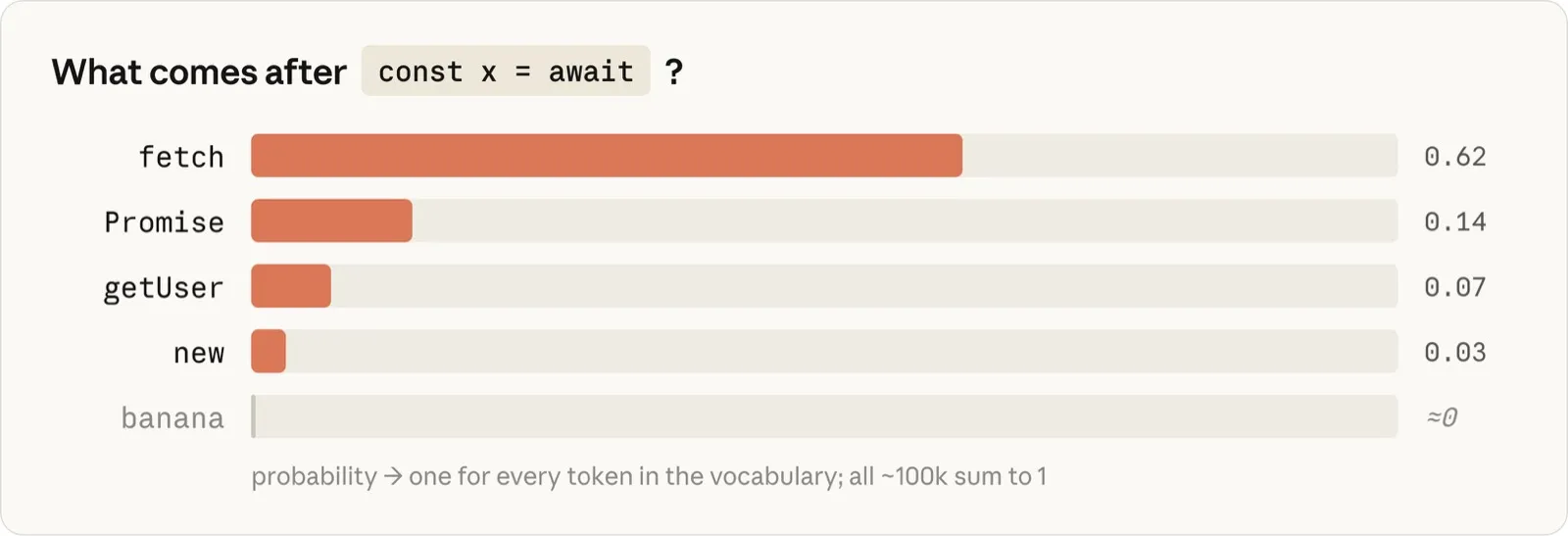
Figure 3: The prediction is output as a probability over every token in the vocabulary. The gap between tokens that fit the context and unrelated tokens is extremely large
What converts input tokens into these probabilities is the “weights” (parameters)—billions of numbers organized into enormous matrices. The weights are fixed at training time and are read-only at the moment a request is sent. Prompts, CLAUDE.md, and material placed in context never rewrite the weights. What these can do is “steer” the prediction, and their influence lasts only for that single request. Knowledge of a library that did not exist at training time is not in the weights; providing documentation in context makes it usable, but the model does not retain anything as memory. The phenomenon of confidently calling a nonexistent API (hallucination) is likewise explained not as a failure of retrieval but as the result of the weights generating “the most plausible sequence of tokens given the training patterns.”
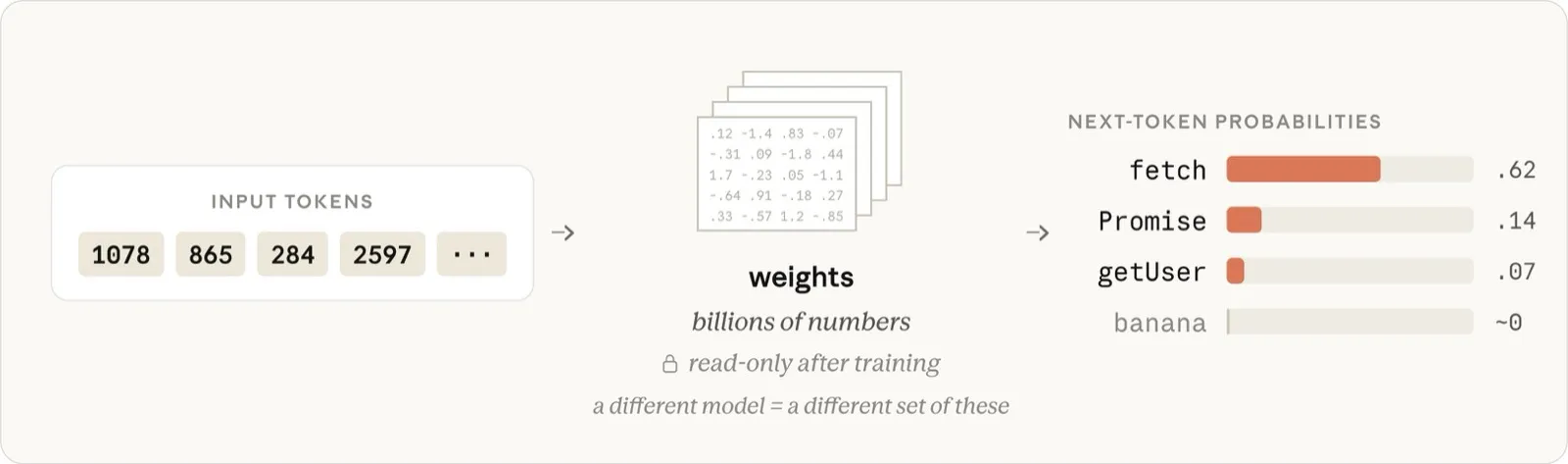
Figure 4: The prompt goes in, and probabilities come out. The weights in the middle do not change after training, and "changing the model" means swapping out this entire set
Also, the model does not generate a response all at once; it predicts one token, appends it to the array, and—conceptually—predicts the next based on the context generated so far, repeating this in a loop to produce output (in practice, a KV cache means the past tokens are not recomputed each time). A 200-token response is a computation that passes through the weights 200 times, and most of the latency and output cost comes from this loop.
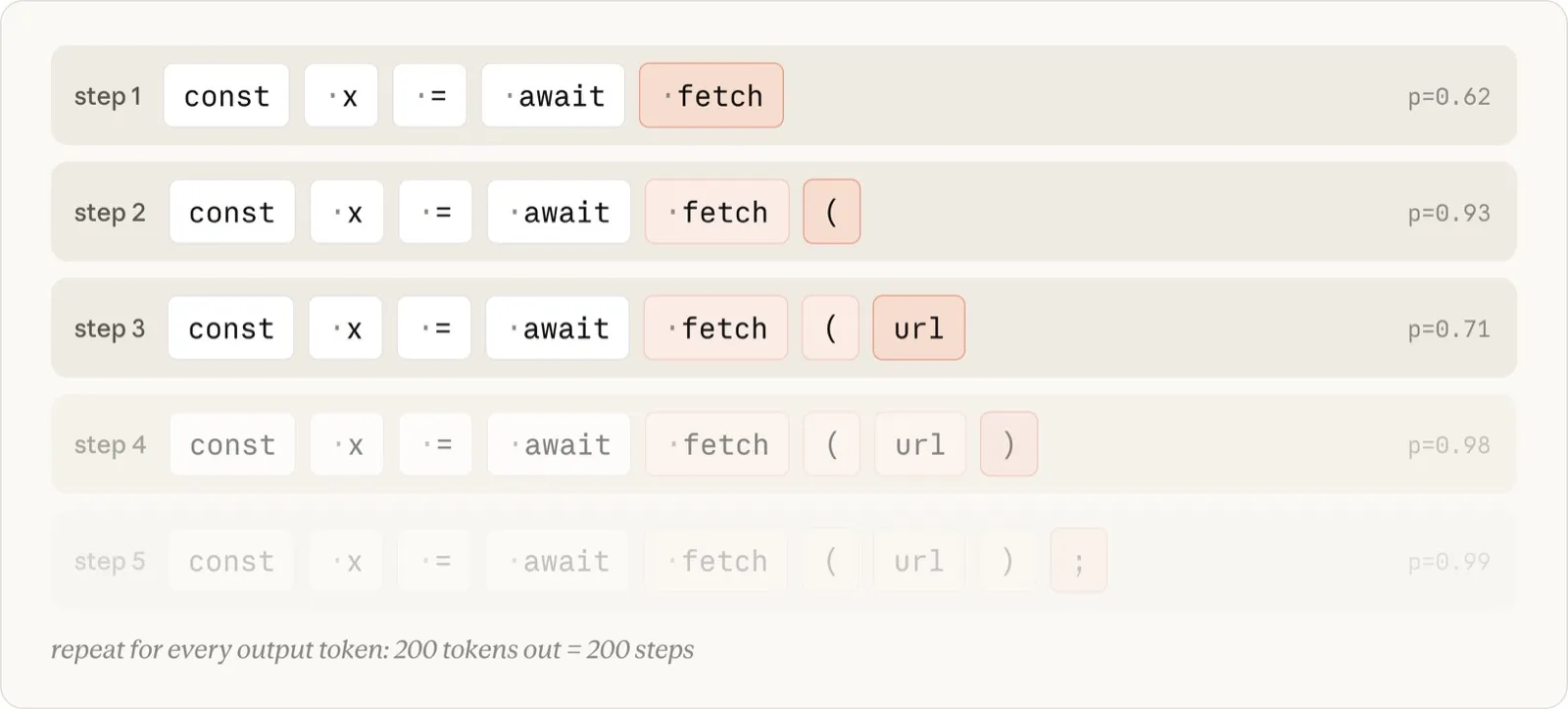
Figure 5: Output is one token per step. Conceptually, the next token is predicted based on the context generated so far
In sum, what the model setting determines is “which set of weights processes the request” and “the per-token price of the output.” What it does not determine is “how many tokens are generated.” The amount generated can vary greatly even for the same prompt—and what governs that is effort.
How effort works — the other input that determines the amount of work
The tokens Claude Code generates while working fall into three kinds—thinking (the reasoning that flows before and after actions), tool calls (structured blocks of tool names and arguments such as Read or Edit), and text to the user (plans, progress, summaries)—but all of them are ordinary output tokens generated from the same loop, and all are billed at the same per-token price. The content of the thinking itself is not shown on the user’s screen, but within Claude Code’s internal processing it is output tokens used to control tool calls and the reasoning process, and consumption is incurred for them.
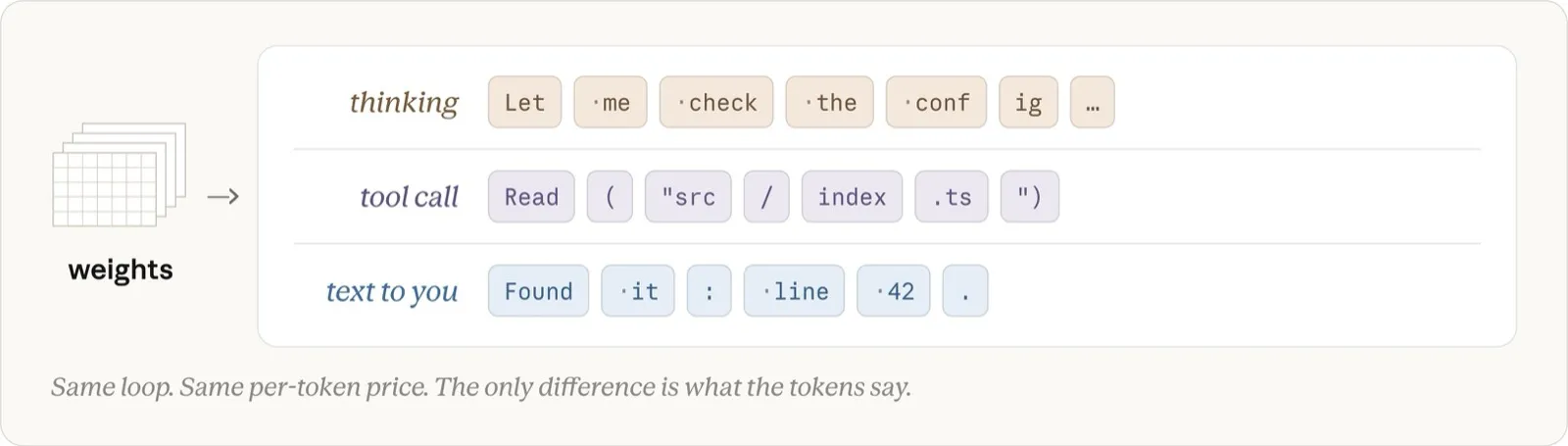
Figure 6: Thinking, tool calls, and body text are all the same output tokens born from the same loop. The only difference is "what the token is saying"
effort governs this amount of generation. In implementation, the effort level is an input sent to the model as part of the request alongside the prompt (in the API, output_config.effort; five levels of low, medium, high, xhigh, and max, with high as the default = the same behavior as not specifying it [2]), and how the model behaves at each level is baked into the weights through the model’s training. The effect is not limited to “thinking time.” In addition to the length of thinking, the original post lists the following three things that effort controls.
- How many files to read
- How much to verify (running tests, reviewing)
- How far to carry a multi-step task without pausing to check with the user
At low effort, Claude is more inclined to ask the user for context than to spend its own tokens investigating. At high effort, the thoroughness and confidence required before it regards a task as complete go up, and many tokens are spent to reach that confidence.
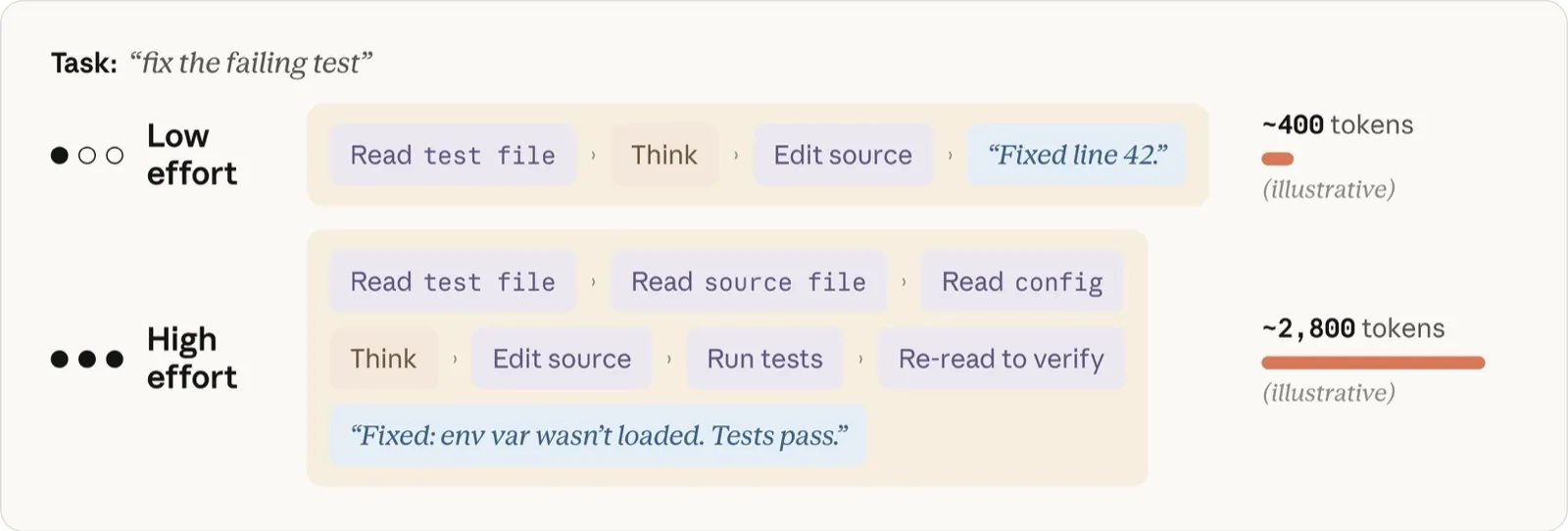
Figure 7: Even for the same prompt, high effort adds steps of reading and verifying, and in this illustrative example uses about 7 times the tokens to reach a higher-confidence answer (token counts are illustrative)
The API documentation describes this property as “effort is a behavioral signal, not a strict token budget” [2]. Even at high effort the plan is not fixed; as intermediate results come in, estimates of progress and confidence are updated, and steps that are no longer necessary are explicitly skipped (this is why task lists get revised mid-execution in Claude Code). Conversely, the design does not artificially inflate consumption when effort is raised on a simple task, and “overthinking” is monitored during training as a factor that lowers performance, the original post states.
Note also that the scale of effort levels is calibrated per model, so the same name “high” does not represent the same value across models [3].
When it gets it wrong, which one do you change
The first thing the original post recommends is to question the context you provided before touching the settings. Is the prompt unambiguous? Is it connected to the appropriate tools and skills? Does it have a means of self-verifying its work? For many tasks that make you want to raise effort, the cause lies upstream like this.
On top of that, the criterion for when it still gets things wrong even after you give it clear context is “did it not know, or did it not try hard enough.”
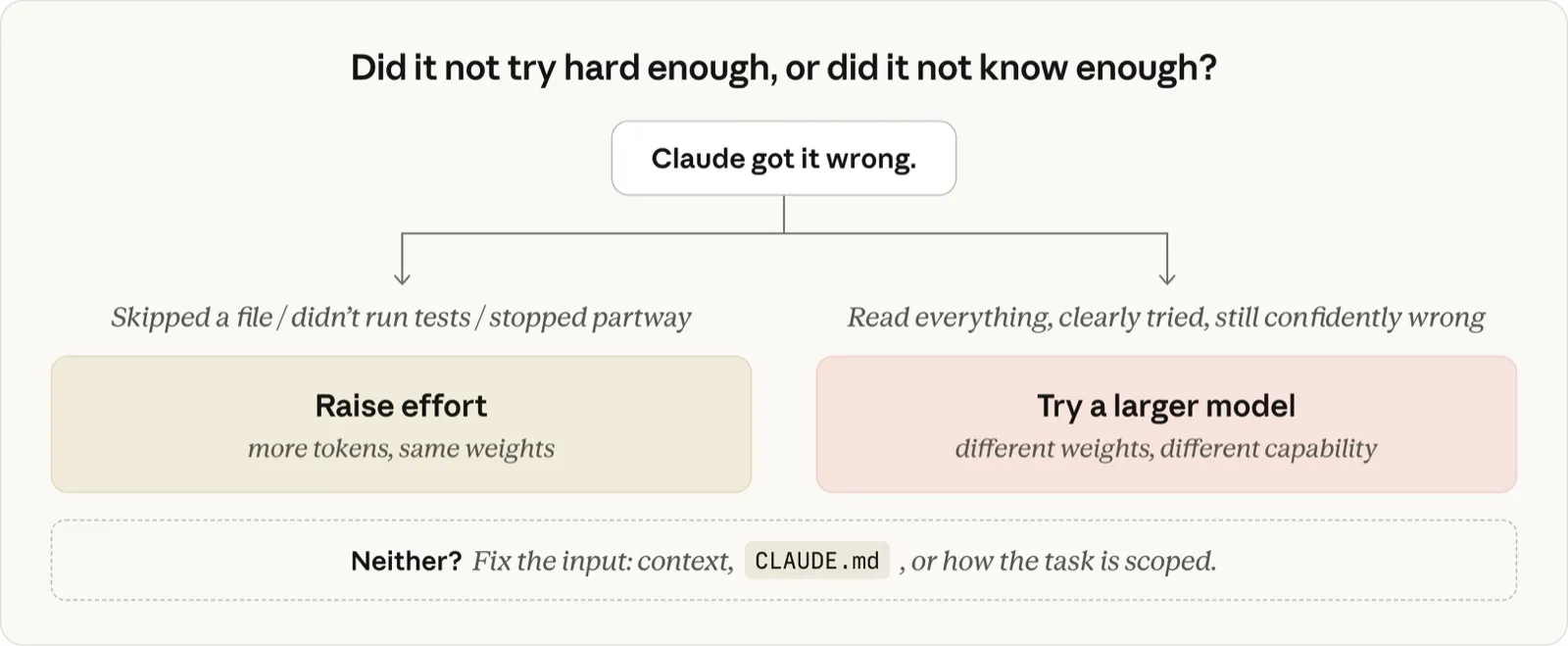
Figure 8: The decision flow. "Did not try hard enough" means effort, "did not know" means model, and if neither, fix the input
- When to change the model (did not know): When the problem itself is hard—a subtle bug, an unfamiliar domain, an architectural decision—and no matter how much context you give, a smaller model keeps confidently getting it wrong. Handling ambiguity is also something larger models are better at; for smaller models, spelling out the execution steps concretely tends to lead to success
- When to change effort (did not try hard enough): When it got things wrong through “cutting corners,” such as skipping over files, not running tests, or neglecting to check. This applies especially when you had set an effort lower than the model’s default
- Conversely, for routine work such as edits that can be executed exactly as described, mechanical changes, or questions about code already in context, dropping to a smaller model does not lower quality and improves speed and cost
Specialist, expert, generalist
The original post likens the relationship between the two settings to people. Fable is a specialist who handles problems almost no one can solve, Opus is an expert, and Sonnet is an excellent generalist; effort corresponds to how much time that person spends on the task. A low-effort Opus is “five minutes with an expert who has solved many similar problems,” bringing in rules of thumb not found in the codebase while not carefully reading through every file. A high-effort Sonnet is “a generalist who can use the whole afternoon,” reading everything, running it, double-checking, and deeply understanding the code in question. Neither is always superior; model corresponds roughly to “how capable,” and effort roughly to “how thorough.”
As for choosing effort, the original post recommends leaving it at the model’s default level for most tasks. The default is tuned so that consumption matches “the amount most people would want to spend on that task,” and it is positioned as something to use not as a per-task operation but as a general preference override based on your own domain or the nature of your work. For example, if you routinely delegate large-codebase edits or work that includes tests, set it higher; if you have many short questions or routine edits, set it lower.
The relationship with cost — model chooses the curve, effort decides how far to go
The relationship between model, effort, and token consumption reverses with the difficulty of the task. For routine work, at the same effort both the larger and smaller models reach the correct answer, and the larger model consumes more because it does extra verification, and its per-token price is higher too.
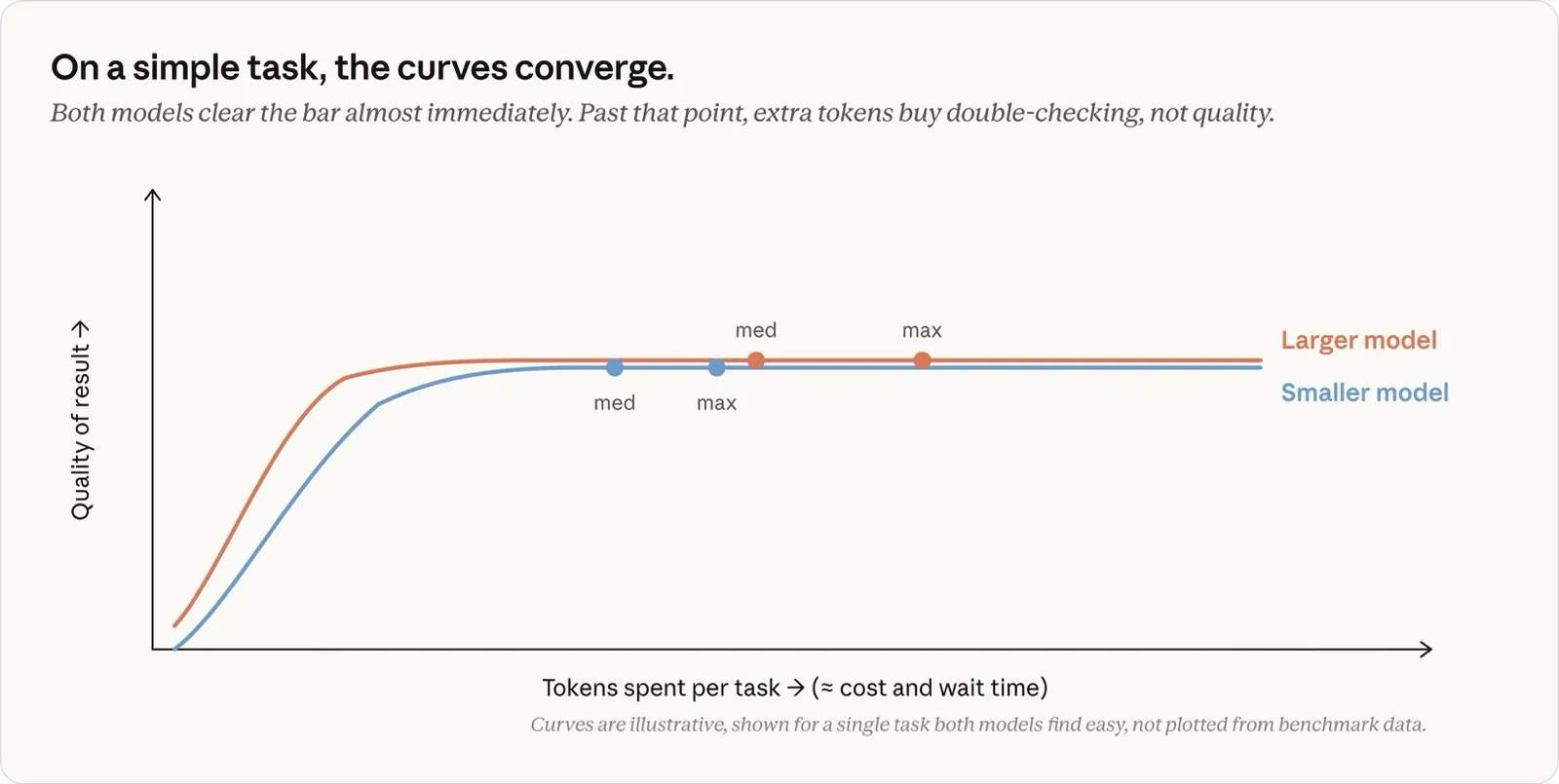
Figure 9: For an easy task, the two models' curves converge. What tokens beyond this point buy is not quality but double-checking (the curves are conceptual illustrations, not measured data)
On the other hand, for hard work spanning multiple steps, the relationship inverts. The smaller model piles up iterations toward the limit of its ability and consumption mounts, while the larger model reaches the same quality level in fewer steps. Even with a higher per-token price, the total cost per task can actually be cheaper. More importantly, the larger model can complete tasks that the smaller model cannot complete even at maximum effort. According to the original post, this difference is most pronounced with Fable 5, which in internal testing completed work that Opus or Sonnet could not reach at any effort (this is also why it has the highest per-token price, and it is recommended to save it for work that truly requires it).
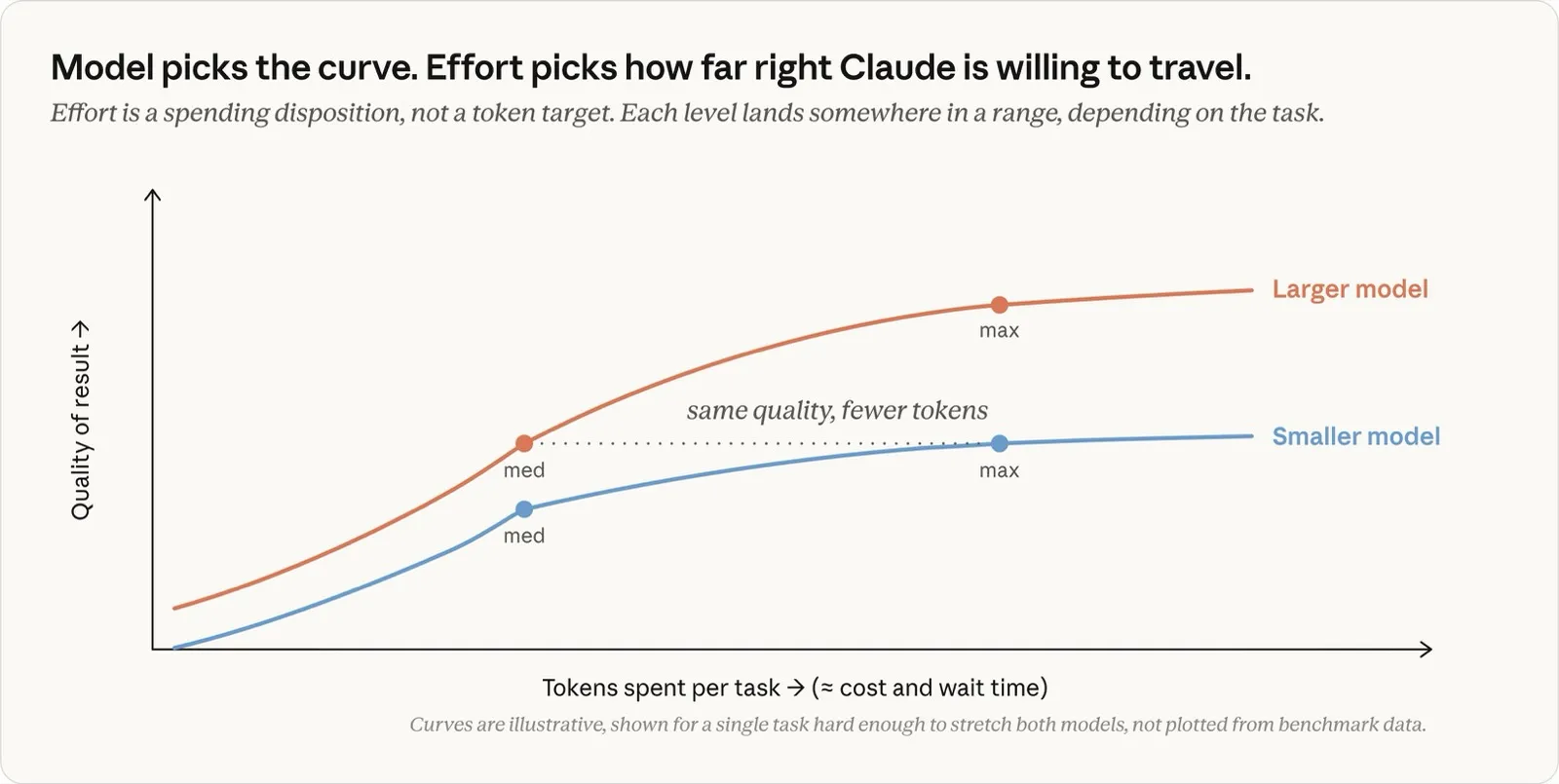
Figure 10: For a hard task, the curves themselves diverge. model chooses the curve, and effort decides how far along that curve to go (the curves are conceptual illustrations, not measured data)
Finally, effort directs token consumption but does not cap it as an upper limit. The only hard cap in the system is max_tokens, which is a blunt means that truncates the response when reached, mainly intended for API developers. In practice, the more useful controls are the gentle ones the model is trained to follow—such as specifying a task budget or asking for brevity in the prompt—which move toward wrapping up as a limit approaches.
How to configure it in Claude Code
According to the Claude Code documentation [3], the two settings are operated as follows.
- model: Switch with
/model. On the selection screen, the left/right keys also adjust the effort slider at the same time - effort: Set it interactively with
/effort, or specify it with the--effortflag at startup, theeffortLevelin the settings file, and so on. The default ishighfor Fable 5, Sonnet 5, Opus 4.8, Opus 4.6, and Sonnet 4.6, andxhighfor Opus 4.7 - If you specify a level a model does not support, it is rounded down to the highest supported level at or below it
- Writing
ultrathinkin the prompt lets you request deep reasoning for that turn alone without changing the session’s effort setting
Note that the original post also includes a practical note on Opus 4.8. In internal testing, Opus 4.8’s default effort produced better results on the same task using roughly the same number of tokens as Opus 4.7’s default effort.
Summary
- Changing the model means swapping out the entire set of trained “weights” that handles the response. Knowledge, ability, and the per-token price change, but the number of tokens generated is not determined by it
- effort is a control over the amount of work—not just thinking time but also the number of files read, the thoroughness of verification, and how far it proceeds without pausing to check. In the API it is sent as part of the request alongside the prompt, and it is a behavioral signal, not a strict token budget
- When you are unhappy with the result, question the context (clarity of the prompt, tools, means of self-verification) before the settings
- If it still gets things wrong, “did it not know, or did it not try hard enough.” If it lacks knowledge, change the model; if it lacks effort, change the effort
- For routine work a smaller model is cheaper, and for hard multi-step work a larger model can be cheaper per task. effort is basically fine left at the model’s default, and if you change it, treat it as a general preference
References
- Model and effort in Claude Code: knowing more vs. trying harder — @ClaudeDevs on X (July 9, 2026, written by Lydia Hallie) — the primary source of this article. All the figures shown are quoted from that post (illustrations by Anthropic)
- Effort — Claude Platform Docs. How to specify
output_config.effort, the five levels, the note that “Effort is a behavioral signal, not a strict token budget,” and so on - Model configuration — Claude Code Docs. That the scale of effort levels is calibrated per model (“The effort scale is calibrated per model”), how to operate
/effortand/model, the per-model defaults, and so on